
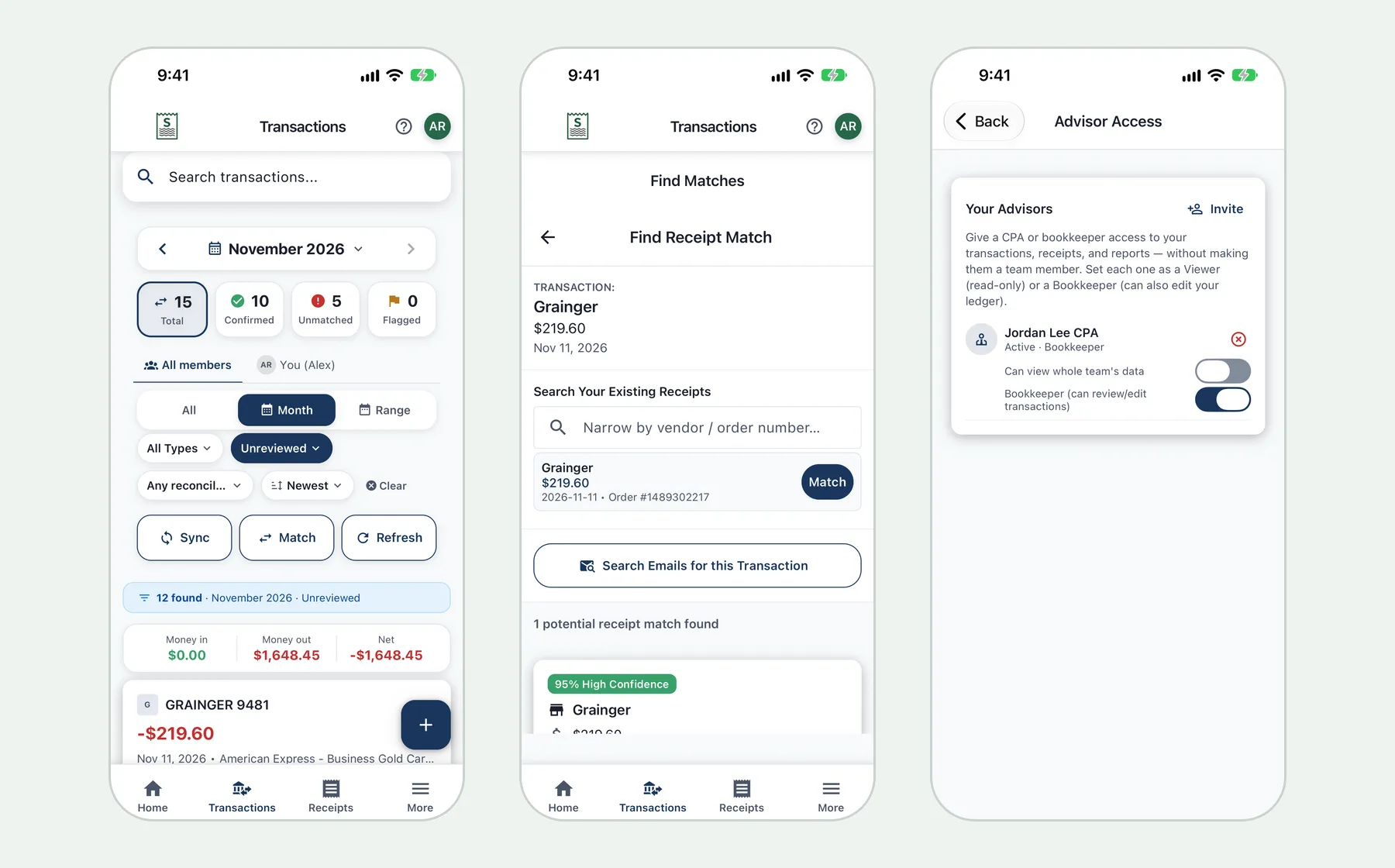
Ask a small-business owner where their receipts are and you'll usually get a list: some in Gmail, some in a supplier portal, a few crumpled in the truck, the rest somewhere in the camera roll. None of them are connected to the bank or card statement that shows what was actually paid. At tax time, or when a bookkeeper asks what a $412.18 charge was for, someone has to piece it all together.
A receipt tracker app fixes this by keeping every receipt in one searchable place. Synceipt also connects each receipt to the bank transaction that paid for it. This guide covers what a small business should look for, what you get on the free plan, and how to set it up in an afternoon.
Start free: create a Synceipt account on the web, or download the iPhone app. The free plan needs no credit card.
What a small business needs from a receipt tracker
Most receipt apps are good at one job: taking a photo of a paper receipt. For a small business, that's the easy part. These are the jobs that take real time:
- Collecting emailed receipts. Software subscriptions, online supply orders and fuel cards mostly send receipts by email, not paper.
- Proving what each charge was. A bank statement shows an amount and a merchant name. The receipt shows what you bought, which is what makes it a deductible business expense.
- Finding the gaps. You need to know which charges still have no receipt, while there's still time to get a copy.
- Sharing with your bookkeeper or CPA without forwarding a pile of emails or handing over your password.
- Keeping business and personal spending separate, especially if you sometimes use the wrong card.
How Synceipt tracks business receipts
Receipts from email, captured automatically
Connect Gmail, Outlook or Yahoo, and Synceipt finds purchase emails and extracts the merchant, date, total, tax and line items. You don't forward anything or set up inbox rules. It's covered step by step in how to extract receipts from Gmail.
Paper receipts, scanned in a batch
Paper receipts from the hardware store, a client lunch or a parts counter go in through the camera. In the iPhone app you can photograph receipt after receipt without waiting, or pick up to 30 photos from your library at once. They're read in the background and you review them in order. See how to scan multiple receipts at once.
Bank and card charges, matched to their receipts
On a paid plan, you connect your business checking and credit card accounts through Plaid, which supports US banks and card issuers. Synceipt pulls in up to about two years of transactions and matches each charge to its receipt by amount, merchant and date. If your bank isn't on Plaid, you can upload a PDF statement and have its transactions extracted instead. The receipt matching guide explains how matches are made and how to fix the ones that are wrong.
One search for every receipt
Every receipt keeps its original photo or email. You can search by vendor, item, order number or amount, filter by date, and see at a glance which receipts are matched to a charge and which aren't.
What you get free, and when to upgrade
"Free" means different things in different apps, so here is exactly what each plan includes. Prices are per month in US dollars.
| Free | Regular — $5.99 | Pro — $9.99 | Pro Plus — $19.99 | |
|---|---|---|---|---|
| Email accounts connected | 1 | 2 | 8 | 15 |
| Emailed receipts extracted per month | 10 | 50 | 200 | 1,000 |
| Photo receipt scans | 10, one time | 20 a month | 50 a month | 150 a month |
| Bank and card accounts (Plaid) | Add-on only | 2 | 5 | 15 |
| AI PDF statement uploads per month | 1 | 10 | 30 | 50 |
| Automatic receipt matching | Yes | Yes | Yes | Yes |
| Tags and project budgets | — | 10 each | 50 tags, 30 projects | Unlimited |
| Separate businesses | — | 1 | 5 | Unlimited |
| Team seats, including you | — | — | 4 | 8 |
| Invoices, light bookkeeping, Excel export | — | — | Yes | Yes |
The free plan works well for trying Synceipt with your emailed receipts and a first batch of paper ones. Most small businesses will want a paid plan, because connecting a bank or card account is what lets every charge be checked against a receipt. A single owner with one business account usually fits Regular. Pro adds the things a business with staff or a bookkeeper tends to need: shared access, invoices, and bookkeeping tools. Pro comes with a 30-day free trial when you subscribe on the web; a card is required, and the trial is available once per account.
Receipts you type in by hand, and photos you attach to them as proof, don't use photo scans on any plan. If you run out of scans or emailed-receipt extractions mid-month, add-on packs are available.
Features that matter once the receipts are in
- Tags. Mark charges by client, job or expense type (Regular and up), then filter by tag when it's time to bill a client or total a category.
- Projects. Group the costs of a job, an event or a remodel and track them against a budget cap. See the project budget tracker guide.
- Separate businesses. If you run more than one business, keep each business's transactions apart (one on Regular, five on Pro).
- Team and advisor access (Pro and Pro Plus). Invite employees into a shared team, or give your CPA or bookkeeper read-only or bookkeeper access instead of sharing a login. Each person uses a seat. See how to share receipts with your team or CPA.
- Invoices (Pro and Pro Plus). Send invoices and match customer payments when they arrive in your bank. See how to create invoices and match customer payments.
- Light bookkeeping (Pro and Pro Plus). Review transactions, reconcile accounts against statements, and run a profit and loss report. See the light bookkeeping walkthrough.
- Recurring bills (paid plans). Spot the subscriptions your business pays for and catch price increases.
Using it for taxes
A receipt tracker can't decide for you which expenses are deductible. That's a question for your tax professional. What it can do is make sure that, when they ask, every business charge has a receipt beside it and is tagged the way you both agreed. Paid plans add tax summaries, including a Schedule C worksheet for sole proprietors; Pro adds Schedule E for rental property and a packet you can hand to your CPA. See how to get tax-ready in Synceipt and how to reconcile your accounts before tax time.
Set it up in an afternoon
- 1
Create a free account
Sign up on the web or in the iPhone app. No credit card is needed for the free plan.
- 2
Connect your business inbox
Go to Email Accounts and connect the Gmail, Outlook or Yahoo address your suppliers send receipts to. Synceipt starts extracting purchase emails.
- 3
Scan the paper backlog
Open Receipts, choose Add, then Scan with AI. Photograph the stack, then review each receipt in order.
- 4
Connect your business bank and card accounts
On a paid plan, go to Bank Accounts and connect through Plaid. If your bank isn't available, upload a PDF statement instead.
- 5
Close the gaps each month
Filter Transactions to unmatched charges. For each one, find the receipt, scan it, or note why there isn't one.
Is it secure?
Bank connections go through Plaid, so Synceipt never sees your bank password. Synceipt has passed an independent CASA Tier 2 security assessment. The iPhone app can be locked with Face ID or Touch ID. If you delete your account, your receipts and other content are permanently deleted 30 days later.
How Synceipt compares with other business receipt apps
Dext, Hubdoc and Expensify are built around accounting firms or expense reports, and their pricing reflects that. Synceipt is built for an owner who wants receipts captured and matched without much effort. For side-by-side comparisons, read Synceipt vs Dext, Synceipt vs Expensify and the best receipt tracking apps of 2026.
Is there a free receipt tracker app for small business?
Yes. Synceipt's free plan includes one connected email account, 10 emailed receipts extracted a month, 10 photo receipt scans to try it, one PDF statement upload a month, and automatic matching. Bank connections need a paid plan or an add-on.
Can I track business and personal receipts in the same app?
Yes, on a paid plan. You can tag business charges, or set up a separate business so its transactions stay apart from personal spending.
Can my employees add receipts?
On Pro and Pro Plus you can create a team and invite people. Pro has four seats including yours, and Pro Plus has eight.
Can my accountant see my receipts?
Yes, on Pro and Pro Plus. Advisor access gives your CPA or bookkeeper their own login with read-only or bookkeeper permissions, and you can revoke it at any time.
Does it work on iPhone and Android?
There's an iPhone and iPad app, and the web app works in any modern browser. An Android app is coming soon; until then the web app works in Chrome on Android.
Which banks can I connect?
US banks and card issuers supported by Plaid. If yours isn't one of them, upload a PDF statement and Synceipt's AI extracts its transactions.
Put every business receipt in one place
Capture emailed and paper receipts, match them to your bank charges, and know which ones are missing before tax time. Free plan available; no credit card required.