
Receipt tracking apps promise to eliminate the shoebox — but they're not all solving the same problem. Some are built for corporate teams submitting expense reports. Some are designed for accountants managing client books. Some target small business owners who already use a specific accounting platform. And some are built for individuals and freelancers who just want to know where their money went.
Choosing the wrong tool for your situation doesn't just waste money — it wastes the time you spend configuring and using a tool that was never designed for your needs. This comparison covers six apps that frequently come up in this category, with honest assessments of who each one is actually built for.
Pricing and features verified as of July 29, 2026, against each provider's own official documentation and help centers — sources are cited at the bottom of this article. Apps update their offerings frequently; confirm current pricing and features on each app's official website before making a decision.
Best Receipt Tracking Apps at a Glance
| App | Automatic email capture | Bank/card sync | Receipt-to-transaction matching | Best for |
|---|---|---|---|---|
| Synceipt | Yes — Gmail, Outlook, Yahoo, zero action per receipt | Yes — Plaid, 12,000+ institutions | Yes — automatic, no upload step | Individuals and small businesses who want the whole pipeline automatic |
| Expensify | No — SmartScan photo, upload, or forwarding to a dedicated address | Partial — corporate/personal card feeds, reimbursement-focused | Yes, inside the expense-report workflow | Teams needing manager approval and reimbursement |
| Dext | No — per-user forwarding address, not inbox OAuth | Yes — Plaid-powered bank feeds | Yes, inside accounting-software sync | Accountants and bookkeepers managing client books |
| Wave | Partial — mobile photo or email forwarding; gated to a paid Receipts/Pro plan | Yes — Plaid-powered bank connections | Basic — within Wave's accounting module | Businesses already paying for Wave's Pro Plan |
| Shoeboxed | Partial — Gmail-only auto-sync, Pro plan only; otherwise mail-in or manual | No bank sync at all | No — receipts only, no reconciliation | Digitizing a backlog of paper receipts |
| SparkReceipt | No — upload or scan, no inbox connection | No — upload bank/card statement files (PDF, CSV, Excel) to match against | Yes, against uploaded statement files | Multi-currency, multi-language receipts with direct QuickBooks/Xero sync |
What to Look For Before Choosing
Not all receipt tracking features are equally valuable. Before comparing specific apps, get clear on what actually matters for your use case:
- Capture method — automatic capture (from email or bank feeds) requires no ongoing effort; manual capture (camera, upload) requires consistent daily action. Automatic beats manual for completeness.
- Bank transaction sync — without bank data, you have receipts but no way to verify or reconcile against what was actually charged
- Automatic matching — linking receipts to their corresponding bank transactions is what creates a verified record; without it, you're just storing files
- Pricing — some apps are free for individuals, expensive for anything more; know the cost at your actual usage level
- Who it's designed for — a corporate expense report tool used for personal finance is the wrong tool, even if the features overlap
- Export and integrations — does it export to CSV? Does it connect to your accounting software?
- Privacy — what does the app store, how long, and does it sell or use your financial data for purposes beyond the service
Expensify
Expensify is a mature, well-funded expense management platform built primarily for corporate teams and employees submitting expense reports for reimbursement. It's widely used in enterprise contexts and has deep integrations with accounting systems like QuickBooks, Xero, and NetSuite.
- Best for: teams and employees who need expense report workflows with manager approval
- Receipt capture: SmartScan (photo OCR) and manual email forwarding to a dedicated address; does not automatically connect to or scan your email inbox
- Bank sync: connects to personal and corporate cards; automatic transaction import
- Automatic matching: yes, within its expense report workflow
- Pricing: free tier is limited for regular personal use; paid team plans are priced per user per month — check current rates at expensify.com
- Integrations: QuickBooks, Xero, NetSuite, Sage, and others via direct connectors
- Limitations: UI and workflow are optimized for expense reports, not personal finance; free tier is restrictive for regular personal use; more app than most individuals need
Dext (Formerly Receipt Bank)
Dext is designed around the accountant-client workflow. The typical use case is a small business owner who uploads receipts throughout the month and an accountant who reviews and codes them into accounting software on the other end. It's a professional tool that happens to work for individuals willing to pay professional-tier prices. If your accountant specifically works inside QuickBooks or Xero, Dext's direct integration with those platforms is hard to substitute; if you just want to give your CPA or bookkeeper direct, permissioned access to your books without a QuickBooks/Xero-centric workflow, Synceipt's own Advisor Access (Pro and Pro Plus) now covers a lighter version of that collaboration natively.
- Best for: small businesses with an accountant who actively uses Dext's collaboration features
- Receipt capture: each user gets a unique "Extract By Email" forwarding address; documents emailed there (or auto-forwarded via an inbox rule you set up) appear for extraction within about 30 minutes — this is a forwarding mechanism, not a direct OAuth connection to your inbox
- Bank sync: bank feeds connect directly to your bank and sync automatically — notably powered by Plaid, the same provider Synceipt uses, at no added cost
- Automatic matching: yes, matching bank feed transactions against submitted documents inside the accounting workflow
- Pricing: a single Business plan that scales with your number of users (5-user minimum) and documents, billed monthly or annually (annual saves 20%); a separate Practice plan (Essentials or Advanced) for accountants managing multiple clients, priced per client — no meaningful free tier for individuals; check current plans at dext.com/us/business/pricing and dext.com/us/partner/pricing
- Integrations: QuickBooks, Xero, Sage, FreeAgent, and 30+ accounting platforms — deep accounting integration is the core value proposition
- Limitations: expensive for individuals who don't need accountant collaboration; email forwarding still requires a per-receipt or inbox-rule setup step, unlike a direct inbox connection; UI reflects professional accounting workflows
Wave Receipts
Wave is a small business accounting platform that includes receipt scanning as one feature among many. Worth knowing up front: as of this writing, receipt scanning itself is no longer part of Wave's free core — it requires a paid Receipts Plan or Pro Plan subscription. If you're already paying for Wave's Pro Plan for invoicing or accounting, the receipt feature adds value at no extra cost; as a standalone receipt tracker, it's a narrower, paid-only tool.
- Best for: small business owners already on Wave's Pro Plan for accounting
- Receipt capture: mobile camera scan, browser upload, or email forwarding — available with a Receipts Plan or Pro Plan subscription, not on Wave's free tier
- Bank sync: yes — Plaid-powered bank connections
- Automatic matching: basic reconciliation within Wave's accounting module; each uploaded receipt creates a corresponding expense transaction
- Pricing: receipt scanning requires the paid Receipts Plan or Pro Plan; Wave's core invoicing/accounting has a free tier, but not this feature — check current plans at wave.com
- Integrations: designed as a self-contained accounting platform; limited third-party integrations
- Limitations: receipt scanning is paid-only, not part of the free tier many people associate with Wave; feature set is designed for small business accounting, not personal finance
Shoeboxed
Shoeboxed takes a unique approach: it lets you mail physical receipts to a processing center where they're scanned, extracted, and imported into your account — solving a backlog-of-paper-receipts problem most apps don't address at all. Less well known: its Pro plan also includes a genuine Gmail auto-scan feature that reads purchase confirmations directly from your inbox and extracts them with no forwarding step, an important capability most "mail-in" positioning misses. It's still a receipt-only tool with no bank-transaction matching, so treat the two capture modes as solving different halves of your paper-vs-digital receipt problem — not a full pipeline the way a bank-connected app is.
- Best for: people with a significant backlog of paper receipts who need them digitized, who also want Gmail-based digital receipt capture on the same Pro-tier plan
- Receipt capture: mail-in physical scanning ("Magic Envelope," volume tiered by plan), mobile camera upload, and manual email forwarding to a dedicated Shoeboxed address on any plan — plus, Pro plan only, automatic Gmail receipt sync that scans your inbox directly with no manual forwarding step (Outlook/Yahoo aren't supported)
- Bank sync: none — no bank or card transaction connection at all
- Automatic matching: none — Shoeboxed organizes and digitizes receipts; it doesn't reconcile them against a bank feed
- Pricing: Starter plan around $9/month (20 paper scans/year); Pro around $29/month (240 scans/year, adds Gmail sync); Plus around $79/month (600 scans/year) — check current plans at shoeboxed.com
- Integrations: QuickBooks Online and Xero (Pro and Plus plans), plus Wave and Evernote export
- Limitations: no bank sync means no reconciliation against what you were actually charged; Gmail sync is Gmail-only and gated to the Pro tier and above; expensive relative to what you get if paper digitization isn't your main need
SparkReceipt
SparkReceipt is an AI receipt scanner built around a different problem than the others on this list: businesses that operate across currencies and languages and need receipts synced directly into QuickBooks or Xero. It reads receipts in virtually any language, handles 190 currencies with automatic conversion, and extracts VAT/tax breakdowns — genuinely strong capabilities the US-focused tools above don't match. What it doesn't have is a live bank connection: transactions come from statement files you upload (PDF, CSV, or Excel), not a direct feed.
- Best for: businesses handling receipts in multiple currencies or languages that need VAT extraction and direct QuickBooks/Xero sync
- Receipt capture: mobile scan or upload; no automatic email inbox connection
- Bank sync: none — matches scanned receipts against bank or card statement files you upload manually
- Automatic matching: yes, between scanned receipts and the transactions in your uploaded statement file
- Pricing: paid plans only — check current plans at sparkreceipt.com
- Integrations: direct QuickBooks Online and Xero sync, plus Zapier, Make, and webhook automation
- Limitations: no live bank feed means your transaction data is only as current as your last statement upload; built for international/multi-currency use, which is more than most US-only users need
Synceipt
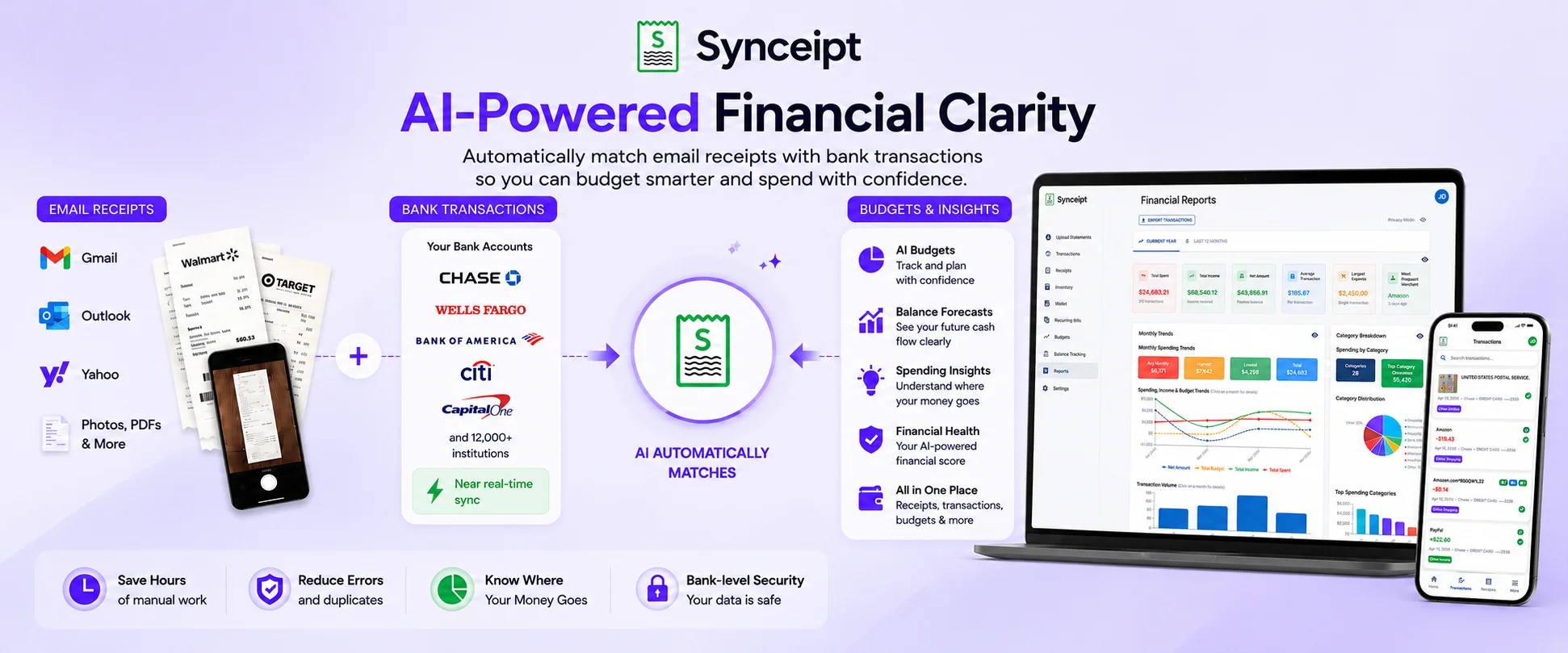
Synceipt is built around a specific premise: the best way to track expenses is to capture receipts automatically from email and match them against bank transactions, so the entire process runs without manual intervention. It's designed for individuals, freelancers, and small business owners who want a complete, reconciled record without daily effort. A team mode lets a business owner invite employees and view all members' transactions and matched receipts in a single centralized view.
- Best for: individuals and freelancers who receive most receipts by email and want automatic matching against bank transactions
- Receipt capture: automatic email inbox extraction (Gmail, Outlook, Yahoo), PDF bank statement upload, manual entry
- Bank sync: Plaid integration for continuous automatic sync
- Automatic matching: yes — the core feature; receipts and transactions are linked by exact amount, merchant, and date
- Pricing: free plan available; paid plans for expanded features
- Integrations: CSV export; no direct accounting software integration currently
- Limitations: no expense report submission or employee reimbursement workflows; no direct QuickBooks/Xero integration; team mode provides owner visibility across members but not approval queues
How to Choose the Right App for Your Situation
The right receipt tracking app depends almost entirely on who it was designed for and whether that matches your situation:
- You submit expense reports and need manager approval or reimbursement workflows → Expensify
- You have an accountant who actively manages your books in QuickBooks or Xero → Dext
- You already pay for Wave's Pro Plan for small business accounting and want receipt capture bundled in → Wave
- You have a significant backlog of physical paper receipts to digitize → Shoeboxed
- You handle receipts in multiple currencies or languages and need direct QuickBooks/Xero sync → SparkReceipt
- You're an individual, freelancer, or small business owner who wants automatic email receipt capture with bank transaction matching — and optionally a team view across employees, or Advisor Access for a CPA/bookkeeper → Synceipt
Most of these apps offer free trials or limited free tiers. Try your top two candidates with real data before committing to a paid plan. Features that look similar on a feature list often work very differently in practice.
Frequently Asked Questions
What's the most important feature to look for in a receipt tracking app?
Capture method matters most. An app that captures receipts automatically — from email or bank feeds — produces a more complete record than one that requires you to photograph or upload receipts manually. Automatic capture works even when you don't think about it; manual capture breaks down during busy periods.
Is Synceipt designed for individuals or businesses?
Synceipt is designed for individuals, freelancers, and small business owners who want automatic receipt-to-transaction matching. It includes a multi-user team mode where a business owner can invite employees and view all members' transactions and receipts in one place, plus a separate Advisor Access grant (Pro and Pro Plus) for a CPA or bookkeeper — read-only Viewer, or a Bookkeeper who can categorize, match, and close the books, without joining as a team member. It does not include expense report workflows or employee reimbursement features — if those are critical to your workflow, Expensify or Dext are better fits.
Can I use a receipt tracking app alongside QuickBooks or another accounting tool?
It depends on the app. Expensify and Dext have direct QuickBooks integrations. Synceipt exports to CSV, which can be imported into most accounting software. Verify your specific integration needs before choosing.
Are these apps safe with my bank data?
Apps that use Plaid (including Synceipt, Dext, and Wave) benefit from Plaid's read-only access model — the app can only read transactions, not initiate them. Review each app's privacy policy before connecting financial accounts, and understand how to disconnect access if you stop using the service.
Is Wave Receipts actually free?
Wave's core accounting platform has a free tier, but receipt scanning specifically requires a paid Receipts Plan or Pro Plan subscription as of this writing. Confirm current pricing at wave.com before assuming it's included free.
Does Shoeboxed read receipts from my email automatically, or only by mail?
Both, depending on your plan. All plans support mailing in paper receipts; the Pro plan and above adds automatic Gmail receipt sync with no manual forwarding. It's Gmail-only (no Outlook/Yahoo), and there's still no bank-transaction matching on any plan.
How does SparkReceipt compare to Synceipt for someone outside the US?
SparkReceipt is the stronger fit internationally — multi-language, 190 currencies, VAT extraction — but it matches receipts against uploaded statement files, not a live bank feed. Synceipt connects live via Plaid but is built around US personal finance and USD.
See how automatic email + bank matching works
Connect your inbox and bank account and Synceipt handles receipt capture, transaction sync, and matching automatically.