
Editorial note: This article compares Synceipt to SparkReceipt. SparkReceipt is a trademark of its respective owner, used here only to identify and describe their product for comparison purposes. This comparison is independent editorial content, not sponsored by, affiliated with, or endorsed by SparkReceipt. We've made a good-faith effort to verify every claim about SparkReceipt against primary and official sources — cited at the bottom of this article — as of July 2026, but pricing, plan names, and features change frequently and may have changed since publication. We provide this comparison for informational purposes only, without warranty of completeness or accuracy, and it shouldn't be your only source before making a purchasing decision — verify current details at sparkreceipt.com first. Spot something that's wrong or out of date? Email support@synceipt.com and we'll correct it.
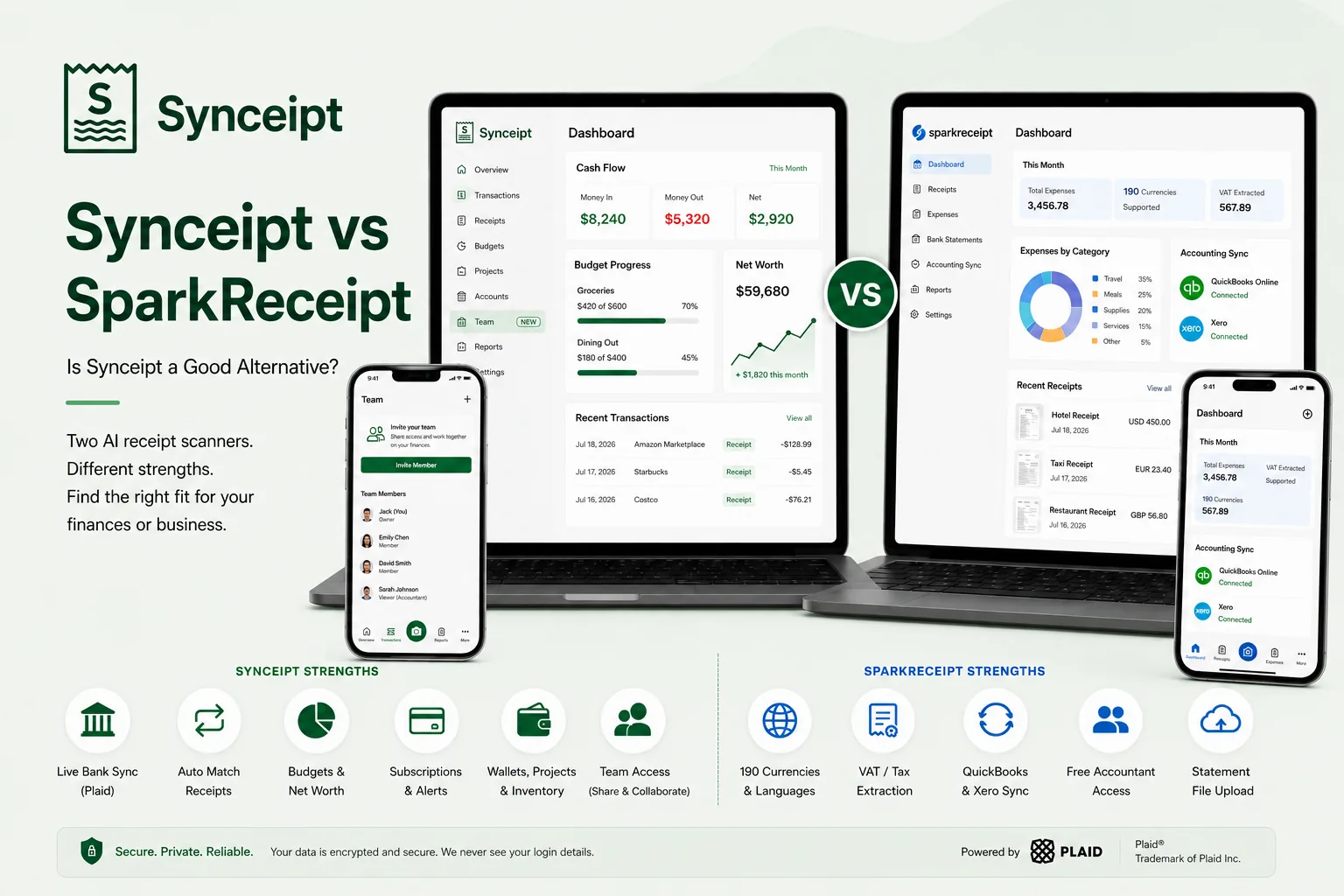
Synceipt and SparkReceipt overlap more than most comparisons on this blog: both are AI receipt scanners, both pull receipts automatically from your email inbox, both extract line items, and both can match receipts against bank transactions. If you've used one, the other will feel familiar. The real differences are in what surrounds that shared core — and who each product is built for.
SparkReceipt is an international, accounting-oriented tool: it reads receipts in almost any language and 190 currencies, extracts VAT, and pushes categorized expenses and receipt images straight into QuickBooks Online or Xero. Synceipt is a US-focused personal and small-business finance app: automatic receipt-to-bank matching is the core, but it's wrapped in live Plaid bank sync, budgeting, net worth tracking, subscription monitoring, and a self-contained light bookkeeping ledger. This comparison walks through where they genuinely compete and where each one does something the other doesn't attempt.
Synceipt vs SparkReceipt at a Glance
| Feature | Synceipt | SparkReceipt |
|---|---|---|
| Automatic email receipt import | ✅ Yes — Gmail, Outlook, Yahoo (OAuth) | ✅ Yes — Gmail, Outlook, Microsoft 365, any IMAP/POP |
| Photo / PDF receipt scanning with line items | ✅ Yes — every line item | ✅ Yes — line items plus VAT/tax breakdown |
| Live bank & card connection (continuous sync) | ✅ Yes — Plaid, 12,000+ institutions | ❌ No — statement file upload only |
| Bank statement file upload | ⚠️ Partial — PDF upload (AI) | ✅ Yes — PDF, CSV, and Excel |
| Automatic receipt-to-transaction matching | ✅ Yes — continuous, from the live bank feed | ⚠️ Partial — against transactions from an uploaded statement |
| Multi-currency with automatic exchange rates | ⚠️ Partial — ~160 currencies supported for recording and reporting; each amount keeps its own currency, totals are shown per currency, and cross-currency figures are converted at that day's European Central Bank rate for the currencies it publishes | ✅ Yes — 190 currencies |
| Direct accounting sync (QuickBooks, Xero) | ❌ No — CSV/Excel export only | ✅ Yes — QuickBooks Online & Xero, with receipt images |
| Accountant / bookkeeper access | ✅ Yes — dedicated Advisor Access, Viewer (read-only, reviewed data) or Bookkeeper (can also categorize, match, and reconcile), drawn from the same paid Pro/Pro Plus team-seat capacity | ✅ Yes — free accountant guest, uses no seat |
| Personal budgeting + AI budget suggestions | ✅ Yes | ❌ No |
| Net worth / account-balance tracking | ✅ Yes | ❌ No |
| Recurring subscription & bill tracking | ✅ Yes — with alerts | ❌ No |
| Project budgets, wallet & resale/inventory tracking | ✅ Yes | ⚠️ Partial — project/client tagging only |
| Free plan | ✅ Yes — free forever | ✅ Yes — 15 documents/month |
| Starting paid price | $5.99/month | $16.65/month (billed annually, 3 users) |
The Short Answer
- Choose SparkReceipt if you operate across currencies or languages, need VAT extraction, want receipts and expenses to sync directly into QuickBooks Online or Xero, or want no-seat accountant guest access even on a solo plan.
- Choose Synceipt if you're US-based and want receipts matched automatically to a live bank feed, plus personal budgeting, net worth tracking, subscription monitoring, and a self-contained P&L — without wiring up external accounting software.
- Both are strong AI receipt scanners with automatic email import and a free tier, so the decision usually comes down to international/accounting-sync needs (SparkReceipt) versus live bank sync and personal-finance depth (Synceipt).
Is Synceipt a Good SparkReceipt Alternative?
If you're looking at Synceipt as a SparkReceipt alternative, the honest answer is that it depends on why you'd switch. Synceipt automates something SparkReceipt makes you do in batches — pulling in and matching your actual bank transactions continuously, instead of waiting until you upload a statement file — and it adds a layer of personal finance (budgets, net worth, subscriptions) that SparkReceipt doesn't attempt. But it does not replicate SparkReceipt's international and accounting-sync strengths.
Who Synceipt works well for as a SparkReceipt alternative:
- US-based freelancers and small businesses who want receipts matched to a live bank/card feed automatically, not to a statement they have to export and upload
- Anyone who wants personal budgeting, AI budget suggestions, and net worth tracking alongside their receipts — none of which SparkReceipt offers
- People who want recurring subscriptions and bills surfaced and monitored automatically
- Small business owners who want a self-contained light bookkeeping ledger and P&L (Pro and Pro Plus) without connecting a separate accounting platform
- Anyone who wants a free-forever plan with no monthly document cap (within AI-extraction limits)
Where Synceipt isn't a replacement: if you rely on the full breadth of SparkReceipt's currency coverage, any-language receipt reading, VAT extraction, direct two-way sync with QuickBooks Online or Xero, or Zapier/Make automation, those are core to SparkReceipt. Synceipt does handle multiple currencies — 10 of them, each amount keeping its own, with totals reported per currency and conversions made at a dated European Central Bank rate — but 10 is not 190, and there is no VAT extraction or any-language reading to go with it. Both apps let an accountant or bookkeeper see your data, but the model differs — SparkReceipt's guest access uses no seat and needs no paid team plan, while Synceipt's Advisor Access (Viewer for read-only review, or Bookkeeper for read/write categorizing and reconciling) draws from the same paid Pro/Pro Plus team-seat capacity a regular team member would use — a seat cost to the plan owner, even though the advisor doesn't pay anything themselves.
What Each App Is Actually Built For
SparkReceipt is a receipt-to-accounting tool for a global small-business audience. Its pipeline is: capture a receipt (photo, PDF, or email), extract the vendor, date, total, VAT, and line items in any language and currency, categorize it to a chart of accounts, and then sync the result — receipt image included — into QuickBooks Online or Xero, or hand it to an accountant with free guest access. Bank data enters by uploading a statement file, which the AI extracts and reconciles against your receipts.
Synceipt is a US personal and small-business finance app built around one live pipeline: read receipts from your inbox automatically, sync bank and card transactions automatically via Plaid, and match the two continuously without a file upload. Everything else — item-level budgets, AI budget suggestions, net worth, subscription tracking, the wallet, project budgets, and a light bookkeeping ledger with a P&L — is built on top of that always-on matched record.
Pricing, Side by Side
SparkReceipt pricing reflects sparkreceipt.com as of July 2026; third-party listing sites show older tier structures, and plans/limits change. Confirm current pricing at sparkreceipt.com/pricing before subscribing to either product.
- Synceipt Free — $0/month forever. 1 email account, manual PDF bank statement upload, limited AI receipt extractions, manual transaction/receipt entry, budget tracking — no per-document cap beyond the extraction limit.
- Synceipt Regular — $5.99/month, no trial (a previous 14-day trial was retired). 2 email accounts, 2 Plaid bank connections, automatic matching, recurring bill tracking, inventory sale tracking.
- Synceipt Pro — $9.99/month, with a 30-day free trial (credit card required). 8 email accounts, 5 bank connections, advanced reporting, a light bookkeeping ledger with chart of accounts, P&L, and revenue-by-customer export, team sharing for up to 4 members, 30-day money-back guarantee.
- Synceipt Pro Plus — $19.99/month. 15 email accounts, 15 bank connections, unlimited tags, the same light bookkeeping ledger as Pro, team sharing for up to 8 members (expandable), priority support.
- SparkReceipt Free — $0/month, 15 documents per month, no time limit and no credit card required.
- SparkReceipt Elite — $16.65/month billed annually ($199.98/year), includes 3 users and unlimited documents, with a 7-day free trial and $58/year per additional user. (Some third-party sites list older Pro/Elite tiers at lower prices and document caps — verify on SparkReceipt's own pricing page.)
Both products have a genuine free plan, but they cap differently: Synceipt's free tier limits monthly AI receipt extractions rather than total documents, while SparkReceipt's free tier is a flat 15 documents/month. On paid plans, Synceipt's per-plan pricing (Regular $5.99, Pro $9.99 for up to 4 members) is worth comparing against SparkReceipt's Elite plan, which bundles 3 users. Because the two structure limits so differently — documents vs. bank connections and email accounts — the better value depends on your actual volume and how many people need access.
Receipt Capture and Bank Data
This is where the two overlap most — and where the one real mechanical difference lives.
- Email capture — SparkReceipt: connects Gmail, Outlook, Microsoft 365, or any IMAP/POP inbox and fetches receipts and invoices automatically in the background. Synceipt: connects Gmail, Outlook, and Yahoo via OAuth and reads receipts automatically. Both remove the manual forwarding step; SparkReceipt supports a broader set of providers via IMAP/POP.
- Receipt extraction — SparkReceipt: extracts vendor, date, total, VAT, payment method, and line items, in virtually any language and 190 currencies with automatic exchange rates. Synceipt: extracts every line item and assigns each to a budget category, across 10 supported currencies, with each amount stored in the currency it was charged in.
- Bank data — SparkReceipt: you upload a bank or credit-card statement (PDF, CSV, or Excel) and the AI extracts each transaction, then matches it against your scanned receipts and flags missing deductions or duplicates. Synceipt: connects the account itself via Plaid and syncs transactions continuously — no statement to upload — then matches receipts to those transactions on exact amount, merchant, and date.
- Matching — both apps match receipts to transactions. The difference is timing and source: SparkReceipt matches against a statement you upload periodically; Synceipt matches against a live feed that updates on its own, usually within a few hours of a charge posting.
The practical difference: with SparkReceipt, your bank data is as current as the last statement you uploaded. With Synceipt, transactions arrive on their own through Plaid and get matched in the background whether you open the app or not.
Features SparkReceipt Has That Synceipt Doesn't
SparkReceipt is a genuinely capable tool, and in several areas it does things Synceipt doesn't attempt. If any of these are core to your workflow, SparkReceipt is the better fit:
- Multi-currency support — 190 currencies with automatic exchange-rate conversion, and receipt reading in virtually any language
- VAT and tax-breakdown extraction for non-US tax systems
- Direct, two-way sync with QuickBooks Online and Xero, including receipt-image attachment — Synceipt has no native accounting-software integration and relies on CSV/Excel export
- Automation connectors: Zapier, Make, Pabbly, and webhooks
- Accountant/bookkeeper guest access that uses no user seat and requires no paid team plan — Synceipt's Advisor Access is not equivalent here: it's read-only (Viewer) or read/write (Bookkeeper) rather than a free guest role, and it draws from the same paid Pro/Pro Plus team-seat capacity a real team member would use
- Multiple linked sub-accounts for separating business entities under one login
- EU-based data storage with GDPR compliance and long-term (10+ year) document retention
Features Synceipt Has That SparkReceipt Doesn't
- A live bank and card connection via Plaid (12,000+ institutions) with continuous, automatic transaction sync — no statement file to upload
- Continuous receipt-to-transaction matching from that live feed, updating on its own rather than at upload time
- AI-generated personal budget suggestions and item-level budget tracking
- Net worth and account-balance tracking across checking, savings, credit, loans, and investment/retirement accounts, with a weekly summary email
- Recurring subscription and bill tracking with renewal and price-increase alerts
- Project Journal — project and event budgets with linked transactions, a checklist, vendors, and PDF export (SparkReceipt offers project/client tagging, not a budgeted project hub)
- A wallet for tracking cash and gift-card balances, plus personal resale/sale-event tracking
- A self-contained light bookkeeping ledger (Pro & Pro Plus) — chart of accounts, deposit splitting, period close, and a P&L + revenue-by-customer export — with no external accounting software required
- Independently verified security: Synceipt completed the Cloud Application Security Assessment (CASA) Tier 2, reviewed by TAC Security, an App Defense Alliance authorized assessor
Who Should Choose Which
- You work across multiple currencies or languages, or need VAT extraction → SparkReceipt
- You want receipts and expenses to sync directly into QuickBooks Online or Xero → SparkReceipt
- You want no-seat accountant guest access (even on a solo plan), or to separate multiple business entities → SparkReceipt
- You're US-based and want receipts matched automatically to a live bank/card feed → Synceipt
- You want personal budgeting, AI budget suggestions, and net worth tracking alongside your receipts → Synceipt
- You want recurring subscriptions and bills tracked and alerted automatically → Synceipt
- You want a self-contained light bookkeeping ledger and P&L without connecting external accounting software → Synceipt Pro or Pro Plus
The overlap is real: both are excellent at pulling receipts from your inbox and reading them. The split is what happens next — SparkReceipt routes that data outward into your accounting stack and across currencies, while Synceipt keeps it in one place and builds live bank matching, budgeting, and net worth on top.
Frequently Asked Questions
Can Synceipt replace SparkReceipt?
It depends on what you rely on SparkReceipt for. For its 190-currency coverage, any-language receipts, VAT extraction, or direct QuickBooks/Xero sync, SparkReceipt is purpose-built and Synceipt doesn't fully replicate it — Synceipt supports around 160 currencies for recording and reporting, with no VAT extraction and no accounting sync. For automatic matching against a live bank feed, plus budgeting, net worth, and subscription tracking, Synceipt is a legitimate alternative — especially for US users.
Does SparkReceipt connect to my bank account like Synceipt does?
No. SparkReceipt imports transactions only from statement files you upload (PDF, CSV, or Excel) and matches them to your receipts. Synceipt connects bank and card accounts directly via Plaid (12,000+ institutions) and syncs transactions automatically, with no file to upload.
Does SparkReceipt support multiple currencies and languages?
Yes — it reads receipts in virtually any language and handles 190 currencies with automatic exchange rates, plus VAT extraction. Synceipt is built around US personal finance and USD, so SparkReceipt is the stronger fit for international use.
Does SparkReceipt sync with QuickBooks or Xero?
Yes — it has direct integrations with QuickBooks Online and Xero that push categorized expenses and receipt images into your books, plus Zapier/Make/webhook automation. Synceipt has no native accounting integration; it exports CSV/Excel and includes its own light bookkeeping ledger instead.
Which is cheaper, Synceipt or SparkReceipt?
Both have a free plan — Synceipt's is free forever with limited monthly AI extractions (no document cap), and SparkReceipt's allows 15 documents/month. On paid plans, Synceipt runs $5.99–$19.99/month; SparkReceipt's Elite plan is $16.65/month billed annually and includes 3 users. Confirm current pricing on each vendor's site.
Does SparkReceipt do budgeting or net worth tracking like Synceipt?
No. SparkReceipt focuses on receipts, expense categorization, and tax-ready reports. It has no personal budgeting, AI budget suggestions, net worth tracking, or subscription monitoring — all of which Synceipt includes.
Which is better for a freelancer or small business — Synceipt or SparkReceipt?
If you're international, work in multiple currencies, need VAT, or want expenses to flow into QuickBooks or Xero, SparkReceipt fits better. If you're US-based and want live bank matching plus budgeting, net worth, and a self-contained P&L, Synceipt fits better.
Try Automatic Receipt Matching Free
Connect your inbox and bank account once. Synceipt reads receipts and matches them to your bank transactions automatically from that point forward — no statement uploads, no per-document cap, no accounting setup required.