
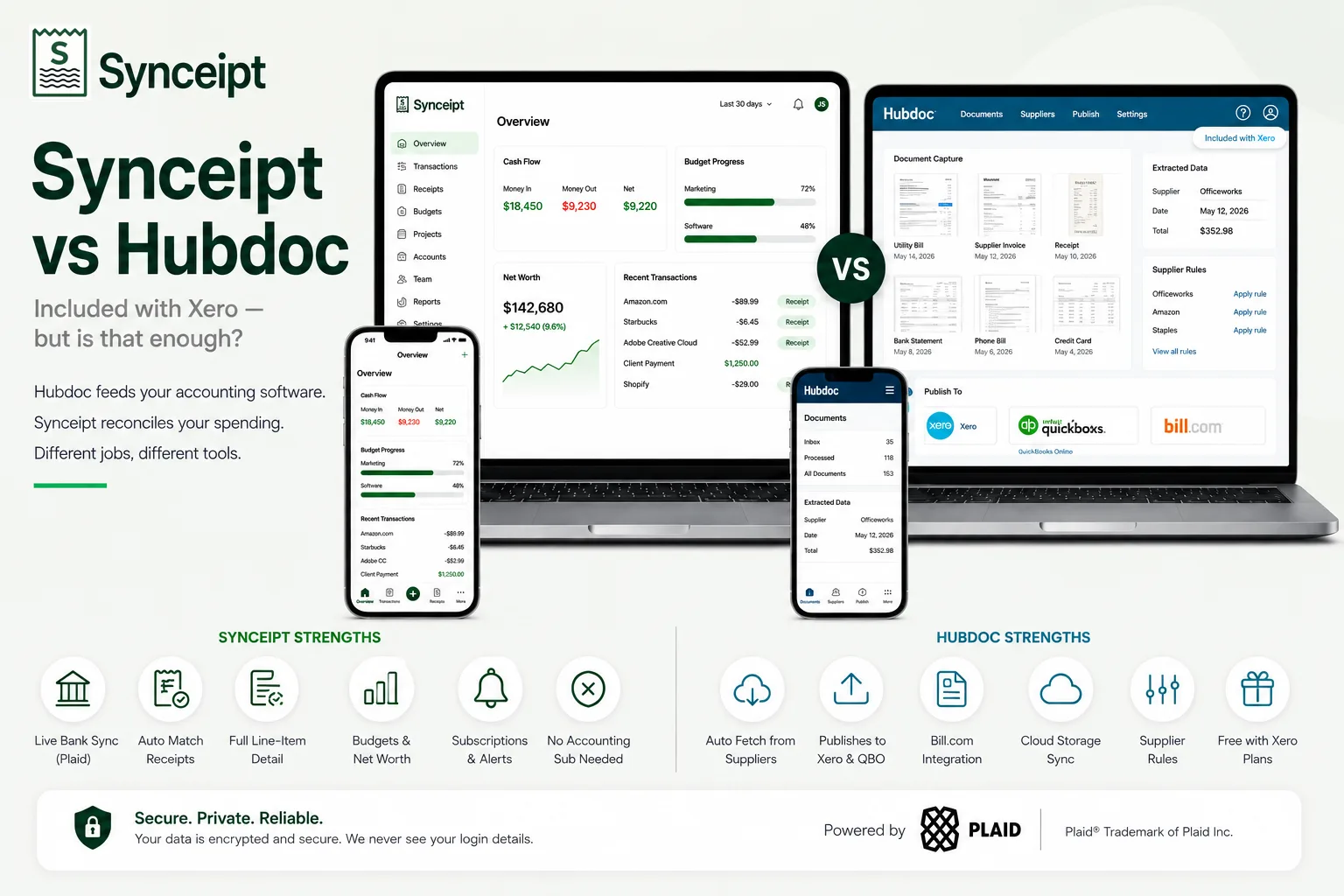
Editorial note: This article compares Synceipt to Hubdoc. Hubdoc and Xero are trademarks of their respective owner, used here only to identify and describe their product for comparison purposes. This comparison is independent editorial content, not sponsored by, affiliated with, or endorsed by Hubdoc or Xero. We have made a good-faith effort to verify every claim about Hubdoc against primary and official sources — cited at the bottom of this article — as of August 2026, but pricing, plan names, and features change frequently and may have changed since publication. Xero has announced US price changes effective 1 October 2026, noted in the pricing section below. We provide this comparison for informational purposes only, without warranty of completeness or accuracy, and it should not be your only source before making a purchasing decision — verify current details at hubdoc.com and xero.com first. Spot something that is wrong or out of date? Email support@synceipt.com and we will correct it.
Hubdoc is unusual among the tools on this blog because it is not really sold as a standalone product any more. Xero acquired it and folded it into their subscriptions, so for most people the question is not what does Hubdoc cost but do I already have it. If you are on a Xero Early, Growing, or Established plan in the US, you do — at no extra charge. That bundling is the single most important fact in this comparison, and it means Synceipt and Hubdoc are rarely competing for the same dollar.
Where they genuinely compete is the case where someone is looking at a Xero subscription primarily to get document capture, or is using Hubdoc and finding that it stops short of what they wanted. Hubdoc is a feeder: it gets paperwork and its data into an accounting ledger accurately. It does not tell you whether you are over budget, what your net worth is, or which subscriptions renewed this month. Synceipt starts from the opposite end — a live bank feed with receipts matched to it — and never involves an accounting platform at all.
Synceipt vs Hubdoc at a Glance
| Feature | Synceipt | Hubdoc |
|---|---|---|
| Works without an accounting subscription | ✅ Yes — standalone product | ⚠️ Partial — bundled with qualifying Xero plans; not included with Cashbook or Ledger |
| Starting price | $0 free forever, paid from $5.99/month | Included with Xero Early ($25/mo, rising to $27 on 1 Oct 2026) |
| Free plan | ✅ Yes — free forever | ❌ No — depends on a Xero subscription |
| Automatic email receipt import | ✅ Yes — Gmail, Outlook, Yahoo (OAuth) | ✅ Yes — forward to a dedicated Hubdoc address |
| Automatic fetch from suppliers and utilities | ❌ No | ✅ Yes — hundreds of institutions, utilities, and online suppliers |
| Photo / PDF receipt scanning | ✅ Yes — every line item | ✅ Yes — supplier, date, and total extracted |
| Line-item extraction | ✅ Yes — every line item, categorized | ❌ No — key header data (supplier, date, total) |
| Live bank & card connection (continuous sync) | ✅ Yes — Plaid, 12,000+ institutions | ⚠️ Partial — fetches bank statements, not a live transaction feed |
| Automatic receipt-to-transaction matching | ✅ Yes — continuous, in-app | ❌ No — matching happens in your accounting software at reconciliation |
| Publishes into accounting software | ❌ No — CSV / Excel export only | ✅ Yes — Xero, QuickBooks Online, Bill.com (US) |
| Cloud storage integrations | ❌ No — documents stored in-app | ✅ Yes — Google Drive, Dropbox, Box, SmartVault, ShareFile |
| Supplier rules for automatic coding | ⚠️ Partial — category rules and merchant aliases | ✅ Yes — supplier rules |
| Built-in bookkeeping ledger + P&L | ✅ Yes — Pro and Pro Plus | ❌ No — it feeds your accounting software instead |
| Personal budgeting + AI budget suggestions | ✅ Yes | ❌ No |
| Net worth / account balance tracking | ✅ Yes | ❌ No |
| Recurring subscription & bill tracking | ✅ Yes — with alerts | ❌ No |
The Short Answer
- If you already pay for Xero Early, Growing, or Established, keep using Hubdoc. It is included in what you already pay, it publishes straight into your ledger, and nothing here argues for paying separately to replace it.
- If you do not use Xero, Hubdoc is a weak reason to start. A Xero subscription costs $25/month today and $27 from 1 October 2026, against Synceipt at $5.99 — and Synceipt matches receipts to a live bank feed, which Hubdoc does not do at all.
- The functional gap runs both ways: Hubdoc fetches documents from suppliers automatically, which Synceipt cannot do. Synceipt extracts every line item and matches against live transactions, which Hubdoc does not do.
Is Synceipt a Good Hubdoc Alternative?
The honest framing is that Synceipt replaces Hubdoc only for people who were using Hubdoc as a general receipt tool rather than as the front door to Xero. Hubdoc exists to get documents and their data into an accounting ledger with the source file attached. If that is what you need it for, Synceipt does not do it and switching would break your workflow.
Who Synceipt works well for as a Hubdoc alternative:
- Anyone using Hubdoc without a Xero subscription, or paying for Xero largely to get document capture
- Freelancers and small businesses that want receipts matched to bank and card transactions automatically, rather than published to a ledger for someone to reconcile later
- People who need line-item detail — what was actually on the receipt — rather than just supplier, date, and total
- Anyone who wants budgeting, net worth tracking, and subscription alerts alongside receipt capture
- Small businesses that would rather keep simple books in a built-in ledger with a P&L than run a full accounting platform
Where Synceipt is not a replacement: Hubdoc's automatic supplier fetch is a real capability with no Synceipt equivalent — it logs into utilities, telecoms, and online suppliers and retrieves statements and bills that may never have been emailed to you. Hubdoc also publishes into Xero, QuickBooks Online, and Bill.com with the source document attached, and syncs documents out to Google Drive, Dropbox, Box, SmartVault, and ShareFile. Synceipt does none of that; it exports CSV and Excel.
What Each App Is Actually Built For
Hubdoc is a document pipeline. Documents arrive by photo, email forwarding, upload, or automatic supplier fetch; Hubdoc extracts the key header data, applies supplier rules to code it, and publishes it into Xero, QuickBooks Online, or Bill.com with the original attached, while archiving a copy to your cloud storage of choice. Its success condition is that a bookkeeper opens the ledger and finds a correctly coded transaction with the paperwork already attached to it.
Synceipt is a self-contained finance app. It reads receipts from your inbox, connects your bank and cards through Plaid, and matches the two continuously without any accounting software in the loop. Its success condition is that you open the app and find your spending already reconciled, categorized down to the line item, measured against budgets, with subscriptions and net worth tracked alongside. On Pro and Pro Plus it also keeps a light bookkeeping ledger with a chart of accounts and a P&L, so a small business can close its own books.
Pricing, Side by Side
Hubdoc has no meaningful standalone price to compare — it is bundled with qualifying Xero plans, so its real cost is your Xero subscription. Xero has announced US price increases effective 1 October 2026. The figures below reflect Xero's published US pricing as of August 2026; confirm current pricing at xero.com before subscribing to either product.
- Synceipt Free — $0/month forever. 1 email account, manual PDF bank statement upload, limited AI receipt extractions, manual transaction and receipt entry, budget tracking.
- Synceipt Regular — $5.99/month, no trial. 2 email accounts, 2 Plaid bank connections, automatic matching, recurring bill tracking, inventory sale tracking.
- Synceipt Pro — $9.99/month, with a 30-day free trial (credit card required). 8 email accounts, 5 bank connections, advanced reporting, a light bookkeeping ledger with chart of accounts, P&L, and revenue-by-customer export, team sharing for up to 4 members, 30-day money-back guarantee.
- Synceipt Pro Plus — $19.99/month. 15 email accounts, 15 bank connections, unlimited tags, the same light bookkeeping ledger as Pro, team sharing for up to 8 members (expandable), priority support.
- Hubdoc with Xero Early — included. Xero Early is $25/month, rising to $27/month on 1 October 2026 (excluding sales tax).
- Hubdoc with Xero Growing — included. $55/month, rising to $59/month on 1 October 2026.
- Hubdoc with Xero Established — included. $90/month, rising to $97/month on 1 October 2026.
- Hubdoc with Xero Cashbook or Ledger — not included; billed separately.
If you already run Xero, Hubdoc's marginal cost is zero and no cost comparison favours switching. The arithmetic only changes for someone who does not need a general ledger: paying $25 to $27 a month for Xero in order to use Hubdoc is roughly four to five times the cost of Synceipt Regular, and you would still not get automatic matching against a live bank feed. Conversely, if you need double-entry accounting, payroll integration, and an accountant working in your ledger, Synceipt at any price is not a substitute for Xero.
Capture, Extraction, and What Happens Next
Both tools get paperwork in the door competently. They diverge sharply on how much they read from it and where it goes afterwards.
- Capture — Hubdoc: mobile photo, forwarding to a dedicated Hubdoc email address, desktop upload, and automatic fetch from connected banks, utilities, and online suppliers. Synceipt: connects Gmail, Outlook, and Yahoo over OAuth and reads receipts from the inbox automatically, plus photo and PDF capture. Hubdoc wins on supplier fetch; Synceipt wins on not having to forward anything.
- Extraction depth — Hubdoc: extracts the key header data, specifically supplier name, date, and total. Synceipt: extracts every line item on the receipt and assigns each to a budget category, which is what makes item-level budgeting possible.
- Coding — Hubdoc: supplier rules automate how each supplier's documents are coded before publishing. Synceipt: category rules and merchant aliases, plus a chart of accounts in the built-in ledger on Pro and Pro Plus.
- Bank data — Hubdoc: fetches bank statements from connected institutions as documents. Synceipt: connects the account through Plaid and syncs individual transactions continuously across 12,000+ institutions.
- Destination — Hubdoc: publishes to Xero, QuickBooks Online, or Bill.com with the source document attached, and archives to Google Drive, Dropbox, Box, SmartVault, or ShareFile. Synceipt: keeps everything in-app, matched to transactions, with CSV and Excel export.
The clearest way to see the difference: Hubdoc's job ends when the document lands in your ledger. Synceipt's job ends when the receipt is matched to the actual bank charge and counted against a budget. Neither one does the other's last mile.
Features Hubdoc Has That Synceipt Doesn't
Hubdoc has capabilities Synceipt does not attempt, and for a Xero-centred business several of them are decisive:
- Automatic fetching of bills, invoices, and bank statements directly from hundreds of financial institutions, utilities, and online suppliers
- Publishing coded transactions into Xero, QuickBooks Online, and Bill.com with the original document attached
- Deep native integration with Xero, including the reconciliation workflow accountants already use
- Document sync out to Google Drive, Dropbox, Box, SmartVault, and ShareFile for backup and sharing outside the app
- Supplier rules that codify how each supplier's paperwork is treated
- Effectively zero marginal cost if you already hold a qualifying Xero subscription
Features Synceipt Has That Hubdoc Doesn't
Synceipt covers ground Hubdoc deliberately leaves to the accounting platform downstream:
- A live, continuous bank and card feed through Plaid, with receipts matched to individual transactions automatically
- Full line-item extraction — what you bought, not just who you bought it from and for how much
- Item-level budgets and AI budget suggestions built on that line-item data
- Net worth and account balance tracking across connected accounts
- Recurring subscription and bill detection with alerts before renewal
- Project budgets, a cash wallet, and resale/inventory tracking with per-item profit and loss
- A self-contained light bookkeeping ledger with chart of accounts and P&L on Pro and Pro Plus, with no accounting subscription needed
- A free forever plan, and a standalone paid plan at $5.99/month that does not depend on any other product
Who Should Choose Which
- Already on Xero Early, Growing, or Established — Hubdoc. You already own it, and it publishes into the ledger you already keep.
- On Xero Cashbook or Ledger — check the numbers. Hubdoc is billed separately on those plans, so compare that line against Synceipt directly.
- Considering Xero mainly to get receipt capture — Synceipt. You would be buying a general ledger you do not need at four to five times the price.
- Freelancer or small business with no accountant and no ledger — Synceipt, comfortably. Hubdoc without an accounting platform behind it is a pipeline to nowhere.
- Need bills fetched automatically from utilities and suppliers — Hubdoc. Synceipt has no equivalent.
- Need item-level budgets, net worth, or subscription tracking — Synceipt. Hubdoc does not attempt any of it.
- Business with a bookkeeper who works in Xero — Hubdoc, and ask them before changing anything.
A reasonable test: if you already pay for accounting software, Hubdoc is probably already included and you should use it. If you do not, Synceipt is the cheaper and more complete answer for reconciling your own spending.
Frequently Asked Questions
Is Hubdoc free?
Hubdoc is included at no extra cost with Xero Early, Growing, and Established plans in the US (Starter, Standard, and Premium elsewhere). It is not included with Xero Cashbook or Ledger plans, which are billed separately. So Hubdoc is free in the sense that it is bundled — but only if you are already paying for a qualifying Xero subscription.
Is Synceipt a good Hubdoc alternative?
If you use Hubdoc without Xero, or you are considering Xero mainly to get document capture, then yes — Synceipt does receipt capture and adds automatic matching against a live bank feed for far less than a Xero subscription. If your books already live in Xero, Hubdoc is bundled with what you pay and publishes directly into your ledger, and Synceipt cannot replace that.
What does Hubdoc actually do?
Hubdoc captures bills and receipts by photo, email forwarding, and upload, and can automatically fetch bank statements, bills, and invoices from hundreds of financial institutions, utilities, and online suppliers. It extracts the supplier name, date, and total, applies supplier rules for coding, and publishes the document with its data into Xero, QuickBooks Online, or Bill.com with the source document attached.
Does Hubdoc match receipts to bank transactions?
Not in the way Synceipt does. Hubdoc publishes documents into your accounting software, and the matching against bank lines happens there during reconciliation. Synceipt connects your bank directly through Plaid and matches receipts to transactions itself, continuously, with no accounting platform involved.
Does Hubdoc work with QuickBooks?
Yes. Hubdoc publishes to QuickBooks Online as well as Xero, and to Bill.com in the United States. It does not integrate with QuickBooks Desktop. Note that Hubdoc is owned by Xero, so the deepest integration and the bundled pricing are both on the Xero side.
Is Xero getting more expensive?
Yes. Xero announced US subscription price increases effective 1 October 2026: Early rises from 25 to 27 dollars per month, Growing from 55 to 59 dollars, and Established from 90 to 97 dollars, all excluding sales tax. If you were subscribing to Xero mainly for Hubdoc, that changes the arithmetic. Confirm current pricing on xero.com before deciding.
Does Synceipt fetch bills from suppliers automatically like Hubdoc?
No, and this is a genuine gap. Hubdoc can log into connected suppliers and utilities and pull statements and bills on its own. Synceipt reads receipts from your email inbox automatically over OAuth, which covers anything that arrives by email, but it does not log into supplier portals to retrieve documents that were never emailed to you.
Can my accountant use Synceipt instead of Hubdoc?
They can see your data through Synceipt Advisor Access as a Viewer for read-only review or a Bookkeeper who can also categorize, match, and reconcile, using your paid Pro or Pro Plus team-seat capacity. But if their practice is built on Xero, they will still want documents in Xero, and Synceipt exports CSV and Excel rather than publishing into it. Ask your accountant before switching.
Try Automatic Receipt Matching Free
No accounting subscription required. Connect your inbox and bank once, and Synceipt reads your receipts and matches them to your bank transactions automatically — with every line item captured, not just the total.