
Meta launched Muse on September 8, 2026. Within days it had climbed to the top of the U.S. App Store charts and pulled in millions of downloads. On September 22, Amazon blocked it, serving anyone who tried to shop there through Muse a popup reading: “Continued access by an unauthorized AI agent violates Amazon's Conditions of Use, to which our customers have agreed.” Two days later, at Meta Connect, Mark Zuckerberg explained the business model in one sentence: “We believe that Muse will make you money… we will profit by taking a small fee from transactions.”
Strip away the platform fight and one fact is left standing: a piece of software now holds your payment details, talks to Walmart, Best Buy, Instacart, Expedia, Wayfair and PayPal, and completes purchases on your behalf. Not someday — shipped, downloaded in the millions, and taking a cut.
Those are September 2026 numbers and they will move — the launch figures, the rankings, and quite possibly the Amazon standoff. The shape of the problem will not, because none of it depends on Muse specifically. OpenAI, Google and Perplexity are building the same capability; Amazon has separately sued or blocked agents from several of them. The fight over who runs the checkout belongs to the whole industry, not one company. Whichever agents come out the other side, what lands in your accounts is identical: a confirmation, and a charge.
Everyone is arguing about who gets to run the checkout. Almost nobody is asking the boring question that lands on you a few months later: when an agent buys something, who keeps the receipt?
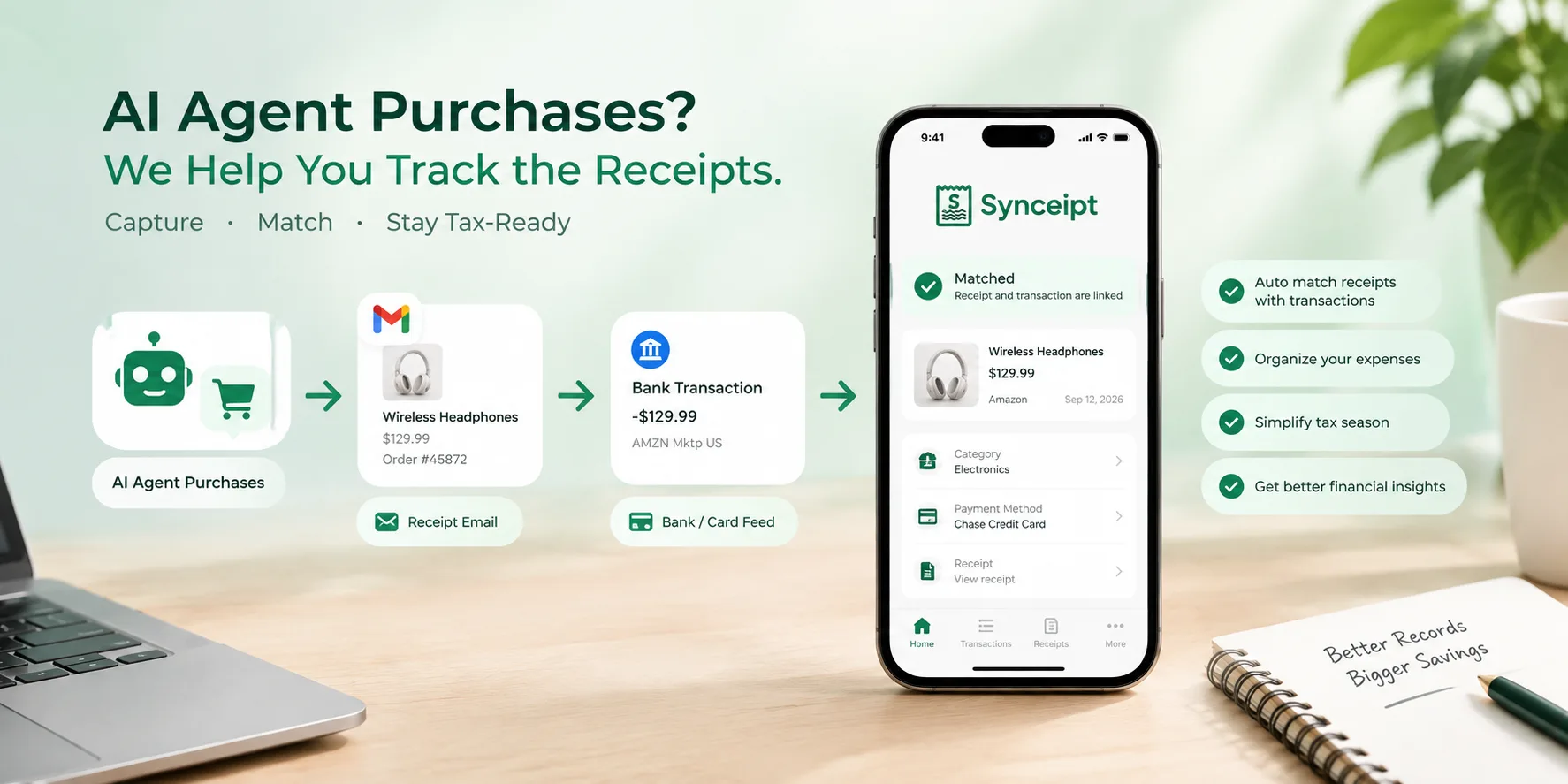
Short answer: you do — and you can automate it. A purchase made by an AI agent still produces the same two artifacts as one you made yourself: an order confirmation in your email inbox, and a charge on your bank or card feed. Connect both to a receipt-matching app and every agent-made purchase is captured, matched and categorized automatically, with the source document attached for taxes, refunds and warranty claims.
Every AI Purchase Leaves Two Records — and Nothing Connects Them
Every purchase produces two artifacts, and they land in two different places that have never spoken to each other:
- A confirmation — an email from the merchant, sitting in your inbox among a few thousand others
- A charge — a line on your card or bank statement, three days later, with a description like SQ *MRCHNT 8841 or AMZN Mktp US*R92KL
Connecting those two is the entire job of bookkeeping, and it is the one thing agentic commerce makes harder rather than easier. Here is why the arithmetic goes the wrong way:
| What changes when an agent buys | What it does to your records |
|---|---|
| Purchase volume goes up — agents comparison-shop across many merchants instead of one | More confirmations, from more vendors you have never heard of, in more formats |
| Your memory of the purchase goes down — you approved an outcome, not a transaction | A charge you genuinely cannot place is no longer a red flag. It is Tuesday. |
| Purchases get split — one request becomes three orders from three retailers | One intent, several charges, several confirmations, no shared reference number |
| Recurring commitments get created as a side effect — a subscription bundled into a checkout | Renewals and price increases nobody consciously agreed to |
The uncomfortable version: you cannot reconstruct from memory a purchase you never made. Every workflow that quietly depended on you remembering — “oh right, that was the printer ink” — stops working the moment the buying is delegated.
And the consequences are not abstract. A charge you cannot identify is a charge you cannot dispute, deduct, return, or expense. For business expenses the IRS expects records that support the amounts and the business purpose you report — not your recollection of the purchase. A warranty claim wants the original order. A refund wants the order number. None of that is produced by the agent — the agent's job ends at “purchased.”
Why Your Inbox and Bank Feed Are the Only Reliable Record of an AI Purchase
Here is the structural insight that makes this tractable, and it is worth sitting with for a second.
No matter who clicks buy — you, Muse, ChatGPT's agent, a procurement bot your accountant set up — two things still happen inside accounts you own. The merchant emails a confirmation to your inbox. The charge posts to your bank or card. The agent is upstream. Your inbox and your bank feed are downstream, and they are yours.
That is the layer Synceipt works on. Synceipt does not integrate with Muse, and does not need to. It reads the receipts that land in your own email account, syncs the transactions that post to your own bank accounts, and links them to each other. Which means it works identically whether an agent bought it, you bought it on your phone, or your spouse bought it in a store.
Amazon can block an agent from browsing its storefront. It cannot block your own order confirmation from arriving in your own inbox, or your own bank from reporting your own charge. The proof layer is the one part of this stack that is not anyone's to fence off — which is exactly why it is the sane place to build your records.
How to Track AI Agent Purchases Automatically, in Four Moves
Synceipt is a receipt-and-transaction matching app. The whole product is four moves, and the first two are the ones that run without you.
- 1
Capture the proof, from wherever it lands
Connect Gmail, Outlook or Yahoo and Synceipt finds purchase confirmations in your inbox and extracts the merchant, date, total and — where the email includes them — the individual line items. Snap a photo of a paper receipt and AI reads it. Upload a PDF bank statement and AI extracts the transactions. Import your Amazon order history file when Amazon's emails go vague. Or type one in by hand for the cash purchase nothing else will ever see.
- 2
Sync the money, from every account
Connect banks and credit cards through Plaid and transactions arrive automatically, including pending ones. You never hand Synceipt your banking password — Plaid handles the connection, and the app sees transactions, not credentials. No bank you want to connect? Upload the statement PDF instead.
- 3
Match them to each other, automatically
This is the part that is genuinely hard, and the reason the app exists. For every receipt-and-charge pair, Synceipt compares the amount, the merchant, and the date — with a merchant alias system, because the receipt says Amazon and the statement says AMZN Mktp US*R92KL. An automatic match requires the amounts to be equal and the merchant names to clear a similarity floor, so it errs toward asking rather than guessing.
- 4
Prove it later, when someone asks
Categorised transactions with their source documents attached, exportable to Excel or CSV with a companion ZIP of the receipt images. A bank reconciliation workspace that ties your records to the statement's ending balance and freezes the result. Read-only access for your CPA. This is the part you will care about in March.
Three Receipt-Matching Details That Matter More When an Agent Buys
- Matching runs on pending charges, not just settled ones. The merchant's confirmation email usually arrives at the moment of purchase, while the bank takes one to three days to post. Synceipt links the two provisionally while the charge is still pending and re-checks when it settles, so a morning order is typically matched by that night's inbox sweep rather than days later when the charge finally clears. For a specific charge you want resolved sooner, you can search your inbox for its receipt on demand.
- Money coming in is confirmed automatically. Salary, refunds, interest and transfers in never have purchase receipts, so Synceipt stops asking about them. Only outgoing charges — the ones that might be an unrecognized purchase — reach your review queue.
- Repeat charges are reviewed in groups, not one at a time. Six charges from the same merchant get one confirmation, not six — except any charge that deviates more than 15% from the group's average, which is pulled out for an individual look. That is precisely how a silent price increase gets caught instead of waved through.
Four Real-World Use Cases, From Household Spending to Small Business Bookkeeping
Abstract benefits do not help anyone decide. Here is what automated receipt tracking looks like for four people with very different problems — a household, a reseller, a freelancer and a small business.
Use Case 1 — The Household That Let an AI Agent Do the Shopping
Dana runs a busy household and has started delegating the routine buying: groceries, replacement parts, birthday gifts, a flight. Forty-odd orders a month across a dozen merchants, most of which she did not personally choose.
What Synceipt changes: every confirmation gets pulled from her inbox automatically and matched to the card charge it belongs to. Her Transactions list stops being a wall of cryptic descriptors and becomes a list of things with receipts attached. Three specific saves in the first month:
- A $68 charge she could not place resolves to a re-order of an item already bought two weeks earlier — caught because both receipts are in the app, not because she remembered
- A $14.99/month subscription bundled into a checkout shows up in Recurring Bills after its second charge, with a renewal date, before it has cost $180
- A duplicate charge from a merchant that billed twice is visible as two charges against one receipt, which is a thing you can take to the bank
She is not doing bookkeeping. She is getting the fraud-and-waste benefit of bookkeeping without doing any.
Use Case 2 — The Solo E-Commerce Seller Tracking Cost of Goods
Marcus resells sourced inventory. His margins live and die on cost of goods, and his purchases are increasingly automated: restock alerts trigger orders, price-tracking finds the deal, the order gets placed.
His problem is not “did I spend this,” it is “what exactly did I buy, at what unit cost, and did it sell.” Synceipt's item-level extraction pulls line items out of receipts, so a $412 order becomes fourteen items with individual prices, not one number. Those items become inventory records; when one sells, he marks it sold and the profit is computed against what he actually paid for that unit.
Why Agent Shopping Makes Amazon Receipt Tracking Harder
Amazon is the sharp end of this problem, for two reasons that arrived within months of each other. In July 2026 Amazon stopped putting product names, quantities and per-item prices in its order emails — subjects that used to read “Ordered: Bounty Essentials…” now read “Ordered: 1 Essentials item”. Then in September it began blocking AI agents from its storefront outright. So the merchant most likely to be buying on your behalf is simultaneously the one telling you least about what you bought.
The fix is to stop relying on the email. Amazon still lets you download your full order history as a file, and importing that restores the item detail an email no longer carries — product names, quantities and unit prices, matched per shipment rather than per order, which is what makes it line up with the charges your card actually posted.
The thing to notice: the more of his buying he automates, the more his records depend on extraction rather than memory. Item-level capture is not a nice-to-have for a reseller — it is the difference between a COGS figure and a guess.
Use Case 3 — The Freelancer Getting Tax-Ready Without the March Scramble
Priya is a contract designer. Software subscriptions, a co-working membership, client lunches, hardware, an annual conference. Every year she spends a weekend in March reconstructing twelve months from a bank statement and calling it close enough.
The change is that the reconstruction never has to happen, because the record was built continuously. Her inbox receipts are already captured and matched. Her categories are already assigned. In March she does three things:
- Filters transactions to last year and the business categories
- Exports to Excel — with one worksheet tab per category — plus the companion ZIP of receipt images, where the filenames line up with the Document Link column in the spreadsheet
- Sends both to her accountant — or, on a Pro plan, grants read-only advisor access so the accountant pulls what they need without an email thread
The weekend is now twenty minutes. More importantly, the deductions she forgot in previous years — the ones she could not substantiate and so did not claim — are all still there, because nothing depended on her remembering them.
Use Case 4 — The Small Business Automating Job Costing and Bookkeeping
Elena runs a four-person remodeling contractor. Materials get bought per job by whoever is closest to the supplier, and she invoices clients in stages. Her bookkeeper wants the books to tie out; she wants to know which jobs actually made money.
Synceipt handles this as one loop in both directions:
| Direction | The document | The money | What Synceipt does |
|---|---|---|---|
| Money out | Supplier receipt or vendor invoice | Card or bank charge | Matches the receipt to the charge, tagged to the job |
| Money in | The invoice she issued | Customer deposit | Matches the deposit to the invoice it paid, including partial payments |
Each job is a Project, so materials, subcontractor payments and client deposits roll up per job. Her bookkeeper reconciles each account against the bank statement's ending balance, then closes the period — which locks it against later edits. A closed month is a month nobody can quietly change, which is the actual point of closing it.
As purchasing gets more automated — supplier reorder agents, procurement assistants — nothing about this workflow breaks, because it was never keyed to a human clicking buy.
How to Get Tax-Ready Before Tax Season (and Why the Window Is Now)
There is a reason this post is published in September rather than February. Getting tax-ready is not a task you can do in the week before a deadline, for one structural reason: receipts have a shelf life.
- Inbox retention — some merchants' confirmations get auto-archived or deleted; connect your inbox while the year's receipts are still in it
- Bank history depth — Plaid reaches back about two years, so the current and prior tax year are covered, but anything older has already rolled out of reach and has to come from PDF statements you download from the bank yourself
- Thermal paper fades — a glovebox receipt from March is already harder to read than it was, and worse in January
- Your own memory of the ambiguous ones — the $340 charge you can still place today is the one you will not be able to place in four months
A practical order of operations for the next 90 days:
- Connect the email account your purchase confirmations actually go to, then run a few syncs back through the year — each request covers a two-month range, so a full year is a handful of them
- Connect every card and bank account you spend from — the ones you skip are the gaps you will hand-reconstruct later
- Upload PDF statements for any account you cannot connect, so the year has no holes
- Work the unmatched queue once — after that it is a handful of items a week, not a weekend
- Fix your categories now, while you remember what the ambiguous ones were
- Run one export in December as a dry run, so April is a repeat rather than a first attempt
What Synceipt Deliberately Does Not Do: An Honest List
An honest boundary, because the gap between what a tool claims and what it does is where trust goes to die:
- It does not buy anything for you, and it will not. Synceipt has no purchasing capability, holds no payment credentials for merchants, and never initiates a transaction. It is a record of what happened, deliberately kept separate from the thing that makes it happen.
- It does not integrate with Muse or any other agent platform. It reads your inbox and your bank feed, which is what makes it agent-agnostic — and what keeps it working when a platform blocks a platform.
- It is not full double-entry accounting. There is no payroll, no accounts-payable workflow, no general ledger in the Xero or QuickBooks sense. If you need a statutory ledger and a filing accountant's full toolkit, Synceipt feeds that workflow rather than replacing it.
- It does not file your taxes. It produces the substantiated, categorized record your preparer or filing software needs.
- Automatic matching requires the amounts to be equal — a guardrail, not a shortcoming. For a restaurant bill it means capturing the signed copy with the tip and the final total written on it: AI extracts that final total, the bank posts the same number, and the pair matches on its own. Only when the captured total genuinely disagrees with the settled charge — a pre-tip copy, a partial refund — do you link the two by hand. The alternative, an engine that matches amounts that do not agree, is one that quietly guesses about money.
- The Free plan includes no bank connection in its base allowance — but it is not walled off. Bank sync carries a real per-connection cost, so it is not bundled into a free tier; you can buy bank connection slots and extra email accounts as add-ons on any plan, Free included, without moving up a tier. Free also covers email extraction and a starter allowance of AI photo scans.
Synceipt Pricing: What Automated Receipt Tracking Costs
| Plan | Price | Best for |
|---|---|---|
| Free | $0 | Email receipt extraction and a starter allowance of AI scans; bank connections via add-on slots |
| Regular | $5.99/mo | One person, a couple of inboxes and a couple of accounts connected |
| Pro | $9.99/mo | Small business: light bookkeeping, invoices, reconciliation, CPA access, team sharing |
| Pro Plus | $19.99/mo | Higher limits, a larger team, and priority support |
Yearly billing is cheaper, and add-ons cover the case where you need more of one specific thing rather than a whole tier. A 30-day Pro trial is available once per account; it collects a card at signup and converts to a paid plan when the trial ends unless you cancel first.
FAQ: AI Agent Purchases, Receipts and Record-Keeping
How do I track purchases made by an AI agent?
Connect the email account the agent's order confirmations arrive in, and the bank or card accounts it pays from. A receipt-matching app then captures each confirmation, pulls in the charge that settles it, and links the two automatically. No integration with the agent itself is needed, because both records land in accounts you already own. What you get back is a categorized transaction with its source document attached — which is what a tax return, a refund and a warranty claim each ask for.
Does Synceipt work with Meta Muse, ChatGPT agents, or other AI shopping assistants?
It works alongside all of them, without integrating with any of them. Synceipt reads the order confirmations that arrive in your own email account and the charges that post to your own bank and card accounts. Whichever agent placed the order, both of those still happen — so Synceipt captures and matches the purchase the same way it captures one you made yourself.
Do I have to give Synceipt my Amazon or merchant passwords?
No. Synceipt never asks for merchant logins. Gmail and Outlook connect through the provider's own OAuth authorization, so no password is involved at all. Yahoo uses a Yahoo-generated app password — a mail-only credential you can revoke from your Yahoo account at any time, not your Yahoo password. Bank connections go through Plaid, which hands back transactions rather than your banking login. This is a deliberate difference from agent platforms, which need merchant account access in order to buy on your behalf.
What if an agent buys something with a card I have not connected?
The email confirmation is still captured, so you have the proof of purchase; it simply sits unmatched until a corresponding transaction exists. You can connect that account later and let matching run, upload a PDF statement for it, or add the transaction manually.
Do AI agent purchases need receipts for taxes, and is an emailed confirmation enough?
For most business expenses the requirement is a record that substantiates the amount, date, place and business purpose — and an electronic order confirmation or receipt generally serves that, which is why keeping the document matters more than keeping the paper. Synceipt stores the original document alongside the transaction and exports both together. Rules vary by expense type and jurisdiction, so confirm the specifics with your tax professional.
An agent bought the wrong thing and I need a refund. Does this help?
Yes — that is the case receipts exist for. The order confirmation with its order number is attached to the charge, so you have what the merchant will ask for. When the refund arrives, it posts as an incoming transaction, gets auto-confirmed, and upgrades to a match if the merchant sends a return confirmation.
I already use QuickBooks or Xero. Is this redundant?
No, and the overlap is smaller than it looks. Accounting platforms are strong at the ledger and weak at getting source documents into it — which is why practices bolt on a separate capture tool. Synceipt does the extraction and the receipt-to-transaction matching, and exports a clean categorized record. Plenty of people run both.
Do agent-made purchases need a different bookkeeping process?
No — they need the same process applied more consistently. An agent purchase is a new channel, not a new category of expense, and it lands in your books exactly where a manual purchase does. What changes is that you can no longer fall back on remembering the purchase, so capture has to be automatic rather than reconstructed. If you already match receipts to transactions, agent purchases flow through the same pipeline untouched.
How far back can it go when I sign up today?
Two limits, and they behave differently. Bank transactions sync through Plaid reaches back about two years, which covers the current tax year and the one before it; for anything older, download the PDF statements from your bank and upload them, and Synceipt's AI extracts the transactions out of them. Email receipts have no such ceiling — you can pull them from as far back as your inbox goes, in two-month ranges per sync request, so backfilling a full prior year is a handful of runs rather than one. What does not wait is your inbox itself: receipts you or your provider auto-delete are gone regardless of how far back the tool can reach.
Key Takeaways
- AI agents automate the purchase decision; none of them produce your records. Proof is still your problem.
- Every agent-made purchase still leaves an order confirmation in your inbox and a charge on your bank feed — two streams you own, which no platform can block.
- Connecting those two streams to a receipt-matching app captures and matches agent purchases automatically, with no per-agent integration to maintain.
- The payoff is practical: unrecognized charges get identified, duplicates and silent price increases surface, and deductions stay substantiated.
- Connect before tax season, not during it — Plaid's bank history reaches back about two years, and inbox retention, fading paper and your own memory of ambiguous charges do the rest of the shrinking.
Agentic commerce stopped being a prediction the moment an agent with a transaction fee attached went to the top of the App Store. The platforms will spend the next few years fighting over who runs the checkout, and whoever wins, that fight will not produce a single line of your records.
The receipts and the charges still land in accounts you control. Automate the part in between now — before it is four months of purchases you did not make and cannot place.
Build the proof trail while it still builds itself
Connect your inbox in two minutes and let a year of receipts find their transactions. The Free plan never asks for a credit card. The optional 30-day Pro trial is the one that does — it adds bank sync and the bookkeeping tools, is available once per account, and converts to paid at the end unless you cancel first.