
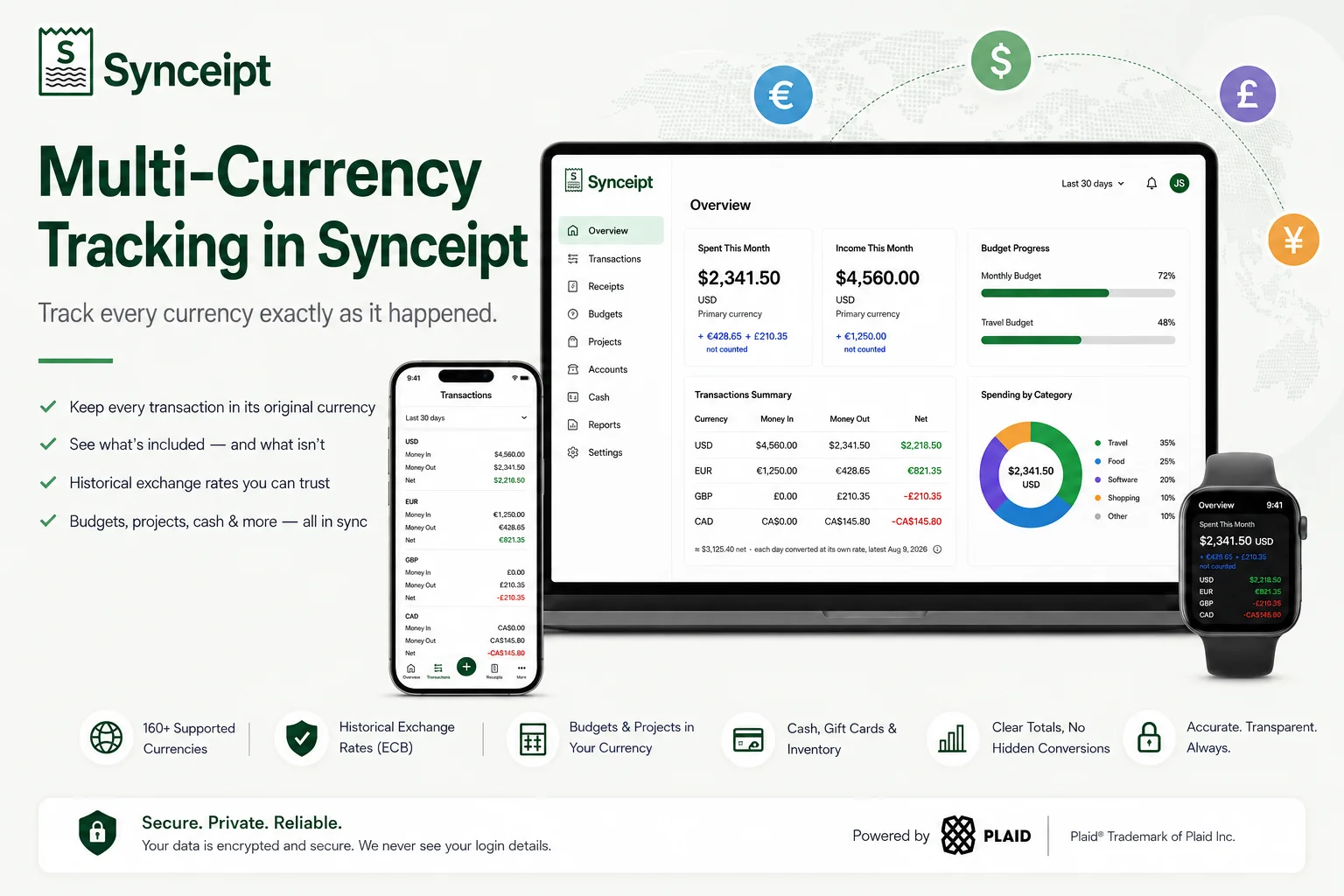
Tracking expenses in multiple currencies can get complicated quickly. A hotel might be charged in euros, a business lunch in pounds, and a coworking space in Canadian dollars — all while your primary currency is USD.
Synceipt's multi-currency expense tracking keeps each transaction in the currency in which it actually occurred. Instead of silently converting foreign transactions into your primary currency, Synceipt shows exactly which amounts are included in your totals, which are excluded, and when historical exchange rates are used for an estimate.
This guide explains how Synceipt handles multiple currencies across bank transactions, receipts, budgets, reports, cash, gift cards, inventory, and projects — including what happens when currencies can't be combined into a single total.
How Does Multi-Currency Tracking Work in Synceipt?
Synceipt keeps every transaction in its original currency instead of permanently converting it into your primary currency. Your primary currency is used for headline figures such as dashboard totals and budgets. When transactions in different currencies need to be compared or estimated together, Synceipt uses historical exchange rates and clearly labels the result as an estimate.
This means a €65.49 transaction remains €65.49, even if your primary currency is USD. You can see the EUR amount directly and, where applicable, see an estimated converted value shown separately.
What Is Multi-Currency Expense Tracking?
Multi-currency expense tracking means recording and organizing income and spending that occurs in more than one currency without losing the original currency of each transaction.
For example, someone living in the United States might pay for a hotel in EUR, a software subscription in USD, and a client expense in GBP. A multi-currency expense tracker needs to preserve those original amounts while still giving the user a consistent way to understand their overall finances.
The challenge is deciding when currencies can be combined and when they should remain separate. Synceipt keeps the original transaction currency permanently and uses a primary currency only where a single-currency figure is actually required.
Why Keep the Original Currency Instead of Converting Everything?
Many finance apps simplify multi-currency tracking by converting foreign transactions into a primary or home currency the moment they're entered. That's convenient at a glance, but it costs you the original number. Once a €65.49 dinner has been converted to dollars using that day's rate, the euro amount is gone — you can no longer see what you actually paid the restaurant, only what a currency calculator thought that meant in dollars on one specific day. Three months later, reconciling a credit card statement that shows the charge in euros, the numbers won't match, and there's no way to tell why.
| Step | Typical multi-currency app | Synceipt |
|---|---|---|
| 1 | Charge occurs: €65.49 | Charge occurs: €65.49 |
| 2 | Converted immediately to a home currency (e.g. $71.20 that day) | Stored as €65.49 — permanently, exactly as charged |
| 3 | Original EUR amount becomes secondary or is discarded entirely | Converted only when a combined figure is needed, using that day's historical rate, and always labeled as an estimate |
A transaction's currency is part of its permanent record in Synceipt, exactly like its amount or date — nothing converts it in place. When a total genuinely needs to combine currencies, the conversion happens only at the moment of display, using a real historical exchange rate that gets recorded rather than silently assumed. A report you open today and reopen next month shows the same figures both times.
The same principle shows up everywhere in the app: never sum two different currencies into one number, and never guess which currency a user meant — not from their App Store region, their IP address, or their phone's locale. Guessing wrong on money is worse than asking.
Which Currencies Does Synceipt Support?
All of them, effectively. Every currency picker in Synceipt — your primary currency, and manually adding a transaction, receipt, gift card, cash entry, or project — searches the full set of roughly 160 active ISO 4217 currencies. Type a code or name ("sw" surfaces both Swedish Krona and Swiss Franc) and pick the one you need.
Ten of the most commonly used currencies are pinned at the top of every picker as quick shortcuts, since they cover most users:
- USD — US Dollar
- CAD — Canadian Dollar
- EUR — Euro
- GBP — British Pound
- AUD — Australian Dollar
- JPY — Japanese Yen
- CHF — Swiss Franc
- CNY — Chinese Yuan
- MXN — Mexican Peso
- BRL — Brazilian Real
That wasn't always the full picture. Manual entry used to be limited to just those ten, while bank-synced transactions and AI-extracted receipts could already carry any currency the source reported. That gap is closed — every manual entry point now searches the same full list, so recording a transaction, receipt, gift card, or cash entry in Swedish krona, Indian rupees, or any other currency no longer means picking the closest available option and remembering the real amount by hand. If you go back and edit an existing record, its real currency is always available and correctly selected — nothing gets silently reset to a currency your bank never reported.
Setting Your Primary Currency
Your primary currency is what Synceipt uses for headline figures — your Dashboard's monthly spending total, budgets, and manual entries default to it. You don't have to set it by hand: if you leave it unset, Synceipt automatically uses the currency of the first bank account you connect. Setting it explicitly overrides that.
- 1
Web: Settings → Profile
Open the searchable Primary Currency field. If nothing is set yet, it reads "Not set — auto-detected from your accounts," with a note underneath: "Used for your headline balance and manual entries. Defaults to your first linked account's currency."
- 2
Mobile: Settings
Tap the Primary Currency row to open the searchable picker. It shows either your current selection or the same auto-detected default as web.
- 3
Search or pick a shortcut
Type to search by code or name, or tap one of the ten pinned shortcuts above for the most common currencies. The default, if you don't choose one, comes from your first linked bank account — never guessed from your location or device language.
How to Record a Transaction in Another Currency
Bank-synced transactions arrive already labeled with their real currency. When you add a transaction manually, the currency field is always visible on the form — not hidden behind an "advanced" toggle, and not shown only to users whose primary currency isn't USD. A USD-primary user paying for something in euros while traveling is exactly who needs that field in plain view at the moment they're recording the charge, not buried where it's easy to miss.
How Synceipt Handles Multi-Currency Spending
Dashboard
The "Spent This Month" card shows your primary currency's total as the headline number. If you also spent money in other currencies this month, a line underneath discloses exactly what wasn't included — for example, "+ €65.49 + CA$45.00 not counted." The figure is never quietly padded or shrunk by foreign spending you can't see accounted for. "Spending by Category" and "Income by Category" work the same way, including in the empty state: if literally all of a month's income arrived in another currency, the card says so directly rather than showing a bare "no data" that reads as broken.
Reports
On the web app, the Reports page states plainly, up top, which currency the figures below it are in, and lists anything left out: "Figures below are in USD. Not included: €65.49 spent and €50.00 income in EUR; CA$45.00 spent in CAD." You're never left wondering whether a total is complete.
Transactions
Filter to any date range, and if your activity in that window spans more than one currency, you get one row per currency — Money In, Money Out, and Net, each in its own currency, not converted or combined. This view is available on every plan, including Free, as a lightweight alternative to a full report.
What Can and Can't Be Combined Across Currencies?
One of the most important questions with any multi-currency finance app is whether everything actually works across currencies, or only some parts do. Here's the honest breakdown:
| Synceipt feature | Multi-currency behavior |
|---|---|
| Transactions | Original currency preserved, always |
| Receipts | Original currency preserved, always |
| Dashboard | Primary currency total + excluded amounts disclosed |
| Reports (web) | Per-currency totals with an exclusion banner |
| Budgets | Primary currency only |
| Projects | Each project can have its own currency |
| Cash wallet | Multiple simultaneous currency balances |
| Gift cards | Any currency, independent of your primary |
| Inventory | Original receipt currency, per item |
| Cash Flow Forecast | Primary currency only |
Multi-Currency Cash, Gift Cards, and Inventory
Your cash wallet can hold balances in more than one currency at the same time — a USD cash balance and a EUR cash balance both exist independently, each shown on its own card once you're tracking more than one. Logging a cash transaction always shows a currency selector, defaulting to your primary but changeable to whatever currency the cash was actually in.
- Gift cards can be denominated in any currency, independent of your primary — a gift card received in pounds stays a pounds balance
- Purchase inventory tracks each item's value in the currency of the receipt it came from, rather than converting it into your primary currency
- A product bought once in USD and again in EUR shows as two separate inventory lines with two separate totals, instead of one blended number that doesn't match either receipt
Multi-Currency Projects and Budgets
A Project (Paid plans) can be set to any currency at creation, independent of your primary — track a Europe trip in euros while your day-to-day spending stays in dollars. The project's budget cap, spend total, and progress bar are all denominated in whichever currency you chose for it.
If a project ends up with spend in a currency other than the one it was set up in — a hotel booked in the local currency while the rest of the trip is on your euro-denominated project, say — Synceipt doesn't guess at a combined percentage. The project detail view says so directly: "This project has spend in more than one currency, so budget progress isn't shown. Spend in [the project's currency] counts toward the budget; other currencies are listed above and not counted." The other-currency amounts are still visible, just not folded into a cap they weren't budgeted against.
Regular Budgets work differently: they're set and tracked in your primary currency only, with no per-budget currency override, and spending in other currencies doesn't count toward a budget cap. Cash Flow Forecast is similar — it projects a single balance forward, so it needs one currency to work from. If your accounts hold balances in more than one currency and you haven't set a primary, the forecast doesn't guess; it tells you exactly why: "Your accounts hold balances in multiple currencies (...) with no primary currency set, so we can't compute a single starting balance to forecast from. Set a primary currency in Settings to enable this." Once a primary currency is set, the forecast runs in that currency and discloses any spending history it had to leave out of the average because it was in a different currency.
Historical Exchange Rates and Currency Conversion
When the Transactions page shows more than one currency in a filtered view, an approximate combined total appears underneath the per-currency rows: "≈ [amount] net · each day converted at its own rate, latest [date]." This is deliberately a secondary, clearly-labeled estimate sitting beside the exact per-currency numbers, never in place of them.
It matters that it says "each day converted at its own rate": a charge from three months ago is converted using the exchange rate from that day, not today's rate, so the estimate reflects what things were actually worth at the time rather than what today's rates would imply about the past.
Those exchange rates come from the European Central Bank's daily reference rates, refreshed once a day. The ECB publishes on business days only — if a rate is missing for a given day (a weekend or holiday), Synceipt carries the last published rate forward and keeps that older date attached to the figure, rather than treating it as current without saying so.
Multi-Currency Expense Tracking for Travel and International Business
The problem multi-currency tracking solves isn't abstract — it shows up for specific people in specific situations:
- Frequent travelers — track hotels, meals, transportation, and other expenses in the local currency they were actually charged in, not a converted guess
- International freelancers — track client invoices and business expenses across the currencies different clients pay and bill in
- Expats — manage day-to-day spending while maintaining accounts and obligations in more than one country's currency
- Small businesses with international spending — keep foreign supplier purchases and business expenses in their original currency instead of a blended, hard-to-reconcile total
How Synceipt Formats Different Currencies
Not every currency works like the dollar. Japanese yen, South Korean won, and Icelandic krona don't use decimal places at all — ¥1,235, not ¥1,235.00. Bahraini dinar, Kuwaiti dinar, and Omani rial use three decimal places instead of two. Synceipt formats every amount according to the actual rules for its currency rather than a single hardcoded two-decimal format, so a yen amount is never shown with cents that currency doesn't have.
Punctuation is separate from currency and follows your device's language settings — the same stored EUR amount displays as €40.00 on a US-locale device and 40,00 € on a German-locale one. The currency itself never changes; only how it's written does.
What Multi-Currency Tracking Doesn't Cover
Two things worth being upfront about. The app's own interface is English-only regardless of which currencies your transactions are in — multi-currency tracking and UI language are separate, and only the former has shipped. And your Synceipt subscription itself is billed in USD (or through Apple's regional App Store pricing) — that's unrelated to the multi-currency ledger described here, which is about the money you track, not the money you pay Synceipt.
Frequently Asked Questions
What is the best way to track expenses in multiple currencies?
Keep each expense in the currency it actually happened in rather than converting it on entry. That way you can always reconcile against the original receipt or statement, and any combined total you look at is clearly labeled as an estimate rather than presented as exact.
Does Synceipt automatically convert foreign transactions?
Not permanently. A transaction's currency is stored exactly as it occurred. Synceipt only converts for display — for example, an approximate combined total on the Transactions page — using a historical exchange rate, and that conversion is always labeled as an estimate rather than applied to the underlying record.
Can I track USD and EUR at the same time?
Yes. Transactions, receipts, cash balances, gift cards, projects, and invoices can all be in either currency — or any other ISO 4217 currency your bank reports, a scanned receipt shows, or you search for and select by hand. All of them can coexist, and your Dashboard shows your primary currency's totals with anything in another currency disclosed separately, rather than blended in. Invoices are the one exception to the conversion behaviour: each invoice carries its own currency, a payment must be recorded in that same currency, and receivables are never FX-converted into your primary currency.
Can I use different currencies for different projects?
Yes. Each Project can be set to its own currency at creation, independent of your primary currency and independent of other projects.
What exchange rate does Synceipt use?
The European Central Bank's daily reference rates. Rates are historical and dated — a transaction converts using the rate from its own date, not the current day's rate, and a missing day's rate carries forward with its original date disclosed.
Does Synceipt support multi-currency bank accounts?
Each bank-synced transaction arrives with its own currency and is tracked as such, regardless of what currency the connected account is denominated in. You don't need to do anything for a foreign-currency charge on a linked account to show up correctly.
Do I have to set a primary currency before I can use Synceipt?
No. If you connect a bank account, Synceipt uses that account's currency automatically. You can set one explicitly at any time in Settings, and it never guesses from your location, App Store region, or device language — only from your accounts or your own choice.
What happens to a transaction's currency if I change my primary currency later?
Nothing. A transaction's own currency is permanent — changing your primary currency only changes which currency your headline totals and new budgets use going forward. Existing transactions keep the currency they were recorded in.
Why does my monthly total look lower than I expected?
Check for a "not counted" line under the total. Synceipt's headline figures are always for one currency (your primary); spending or income in other currencies is disclosed separately rather than added in or subtracted out silently.
Can I convert my whole history into one currency to see a single net worth number?
The Transactions page shows an approximate combined total (marked with ≈) when a filtered view spans multiple currencies, converted using each transaction's own historical exchange rate. It's intentionally shown as an estimate alongside the exact per-currency numbers, not as a replacement for them — Synceipt doesn't overwrite your real per-currency figures with a single converted one.
Track expenses in multiple currencies without losing the original amounts
Connect a supported bank account or add a transaction manually. Synceipt keeps each transaction in its original currency while clearly showing what is — and isn't — included in your totals.