
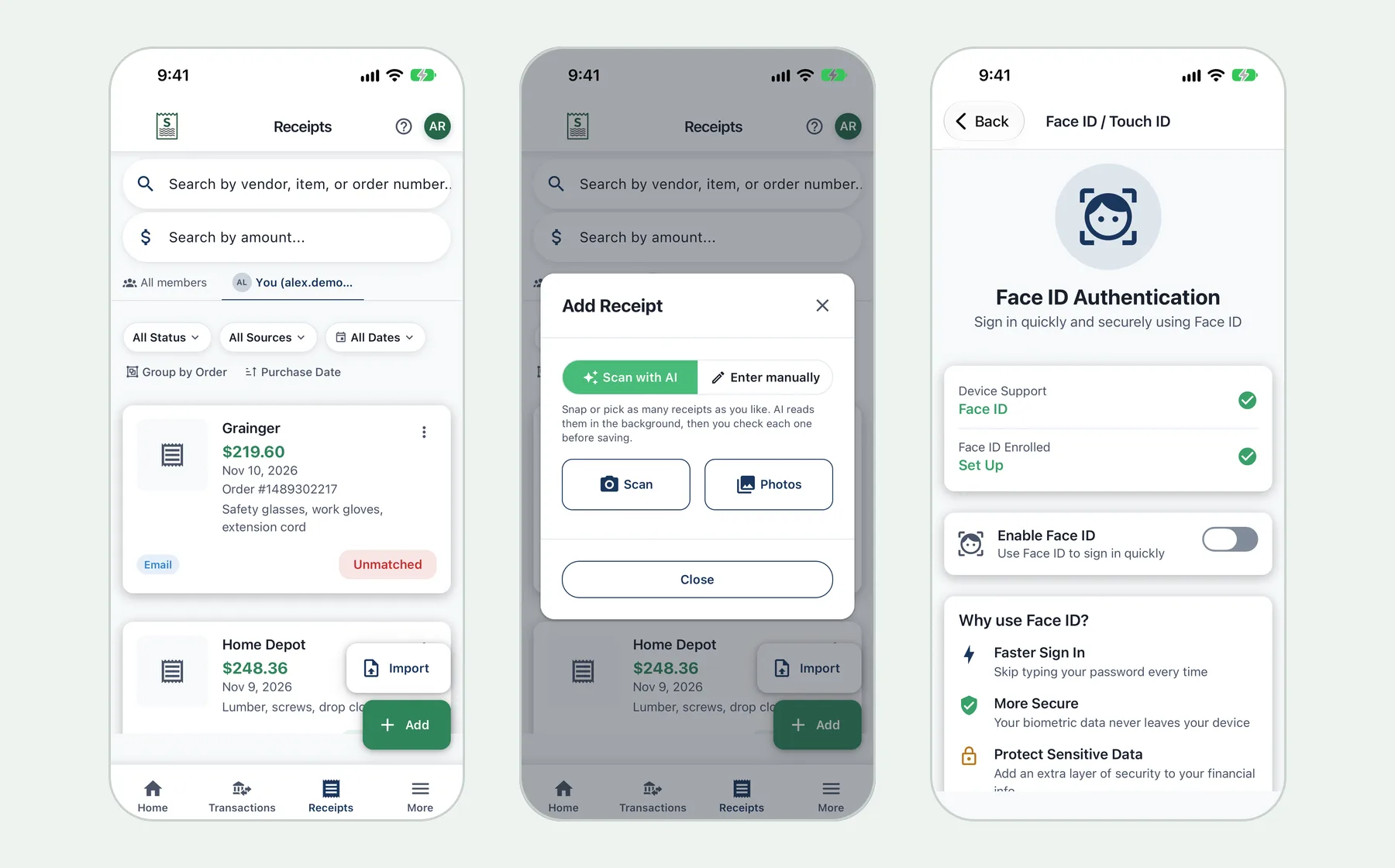
You probably already use your iPhone as a receipt tracker without meaning to. There are photos of receipts somewhere in the camera roll and order confirmations scattered through your email. The trouble is finding the right one when you need it: for a return, a warranty claim, a reimbursement or your taxes.
Synceipt is a receipt tracker app for iPhone and iPad that does the filing for you. It reads receipt photos with AI, pulls receipts out of your email automatically, keeps them all in one searchable list, and can match each one to the bank charge that paid for it.
Download Synceipt for iPhone. It's free to start, with optional paid plans through in-app purchase.
What you can do with Synceipt on iPhone
- Scan a whole stack of receipts. The camera stays open while you photograph receipt after receipt, then tap Done.
- Import receipt photos you already have, up to 30 at a time from your photo library.
- Keep scanning with no signal. Photos wait safely on your phone and upload when you're back online, even if you close the app.
- Get a notification when your scans have been read and are ready to review.
- Capture email receipts automatically from Gmail, Outlook or Yahoo, without forwarding anything.
- Search by vendor, item, order number or amount, and filter by date, source or matched status.
- Match receipts to bank transactions, in either direction: from a receipt, or from a charge that's missing one.
- Lock the app with Face ID or Touch ID.
- Use it on iPad too, with the same account on the web.
How to track receipts on your iPhone
- 1
Install the app and sign in
Download Synceipt from the App Store and sign in with Apple, Google, Microsoft or Yahoo. Choose Continue with Free Plan if you just want to try it.
- 2
Open Receipts and tap Add
Choose Scan with AI. Tap Scan to use the camera, or Photos to pick receipts you've already photographed.
- 3
Photograph the pile
Hold each receipt flat, in good light, so it fills the frame. Keep going until you're done, then tap Done. Each receipt is read in the background.
- 4
Review each receipt
When the scans are ready, open Review Scans. Check the merchant, date, total, tax and items, fix anything that's wrong, and tap Confirm to move to the next one.
- 5
Connect your email
Go to More, then Email Accounts, and connect the inbox your online orders go to. Emailed receipts start showing up on the Receipts tab alongside your scans.
What the AI reads from a receipt
- Merchant name and purchase date
- Total, tax, and tip or shipping where they're shown
- Currency, so receipts from abroad stay in their own currency
- Line items with quantity and price
- Order number and payment method where they're printed
Faded thermal paper, creases and shadows can cause mistakes, which is why you see each receipt before it's saved. You can also type a receipt in yourself and attach its photo as proof. Receipts you enter by hand don't use your photo scans.
A receipt tracker for personal use
You don't need a business to need your receipts. These are the everyday reasons people keep them on their iPhone:
- Returns and refunds. Search the store or item name and show the receipt at the counter.
- Warranties. The Inventory section keeps the things you own with their receipt and warranty date. See how to record and track inventory.
- Gift cards and store credit. Keep balances in the Wallet. See how to track gift cards.
- Budgets by what you bought. Receipt line items feed budgets like groceries or household goods, not just the store name. See item-level budgets.
- Shared household spending. On Pro and Pro Plus you can share a budget with family. See how to share a family budget.
What's free on iPhone
| Free | Paid plans | |
|---|---|---|
| Photo receipt scans | 10 to try it (one time) | 20, 50 or 150 a month |
| Email accounts | 1 | 2, 8 or 15 |
| Emailed receipts extracted | 10 a month | 50, 200 or 1,000 a month |
| Bank and card accounts | Add-on only | 2, 5 or 15 |
| Search, manual entry, automatic matching | Yes | Yes |
Paid plans are Regular, Pro and Pro Plus, billed monthly or yearly through your Apple ID. You can manage or cancel them in your iPhone's subscription settings, and Restore Purchases brings them back on a new device. Add-on packs of scans are also available if you only need more now and then.
What it doesn't do (yet)
- There's no home-screen widget or iOS share-sheet extension. Add receipts from inside the app.
- There's no email forwarding address. Synceipt connects to your inbox instead.
- Bank connections cover US banks and card issuers through Plaid. For other accounts, upload a PDF statement.
- The Android app isn't out yet. On Android, use the web app in Chrome.
What is the best free receipt tracker app for iPhone?
It depends on how you get receipts. If you only have paper receipts, most scanner apps will do. If many arrive by email, or you want them matched to your bank, Synceipt captures email receipts automatically and matches them. Its free plan needs no credit card.
Can I scan multiple receipts at once on iPhone?
Yes. The camera stays open so you can photograph receipt after receipt, or pick up to 30 photos from your library at a time. They're read in the background and you review them in order.
Does Synceipt work on iPad?
Yes. The same app runs on iPad, and your receipts sync with the web app.
Does it work offline?
You can keep scanning without a connection. Photos are saved on your phone and upload automatically when you're back online. Reading the receipts needs a connection.
Is my data protected?
You can lock the app with Face ID or Touch ID, receipt photos travel over an encrypted connection, and Synceipt has passed an independent CASA Tier 2 security assessment.
Turn your iPhone into a receipt tracker
Scan paper receipts, capture email receipts automatically, and find any receipt in seconds. Free to start.